

2 Hours Understanding AI from Zero: A Mental Framework to Never Feel Overwhelmed Again
Every week there's a new AI tool. Today it's Claude Code, tomorrow Codex, next week some weird name. Many people learn AI by chasing tools — and the more they chase, the more overwhelmed they get, because tools are infinite but time isn't.
This post goes the opposite direction. I'm not teaching you which button to click, I'm building you a mental framework. Once you have the framework, whenever any AI tool comes out, you'll look at it once and understand what it is, what it can do, whether it's worth learning.
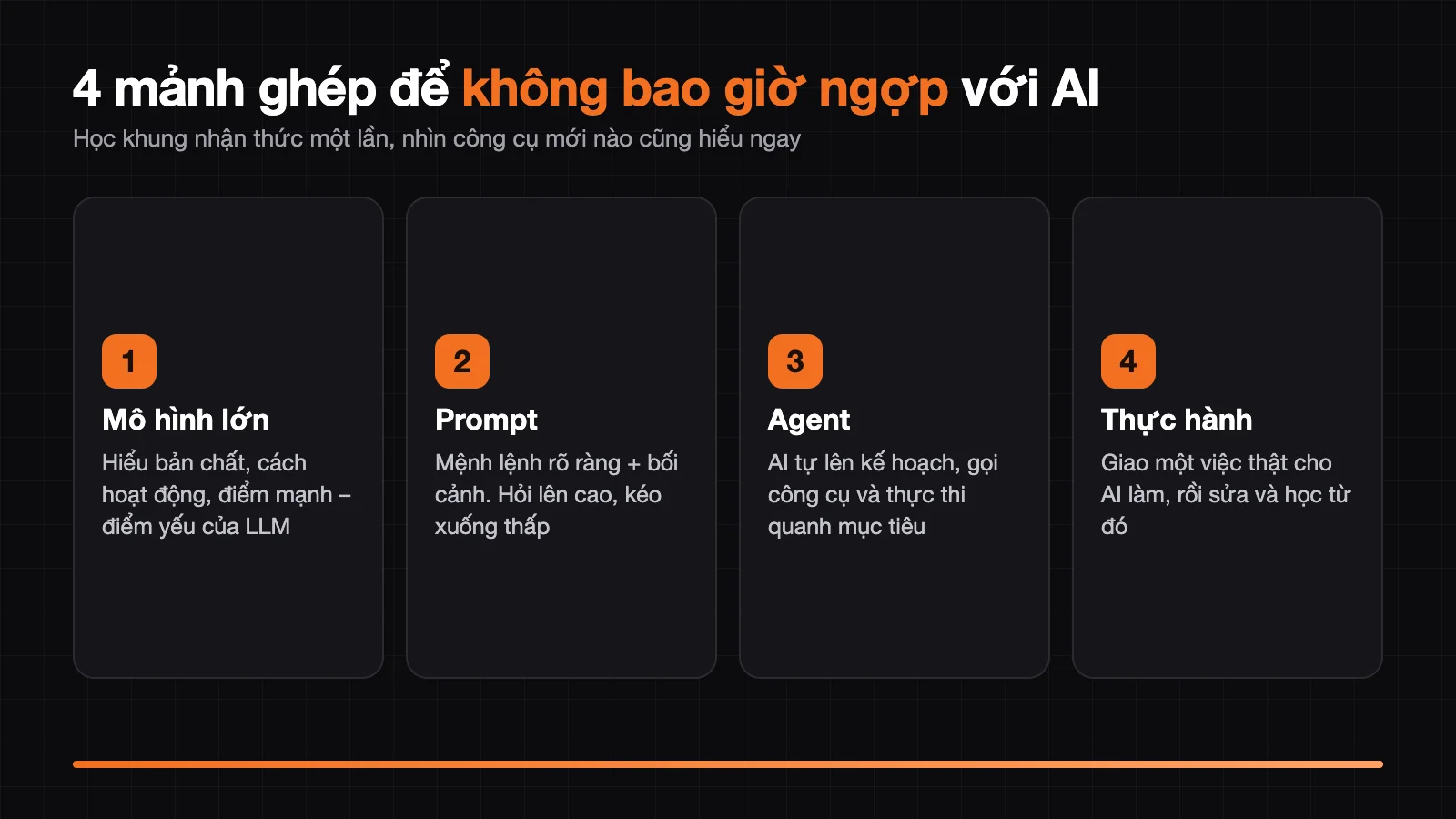
After reading this post, you'll have 4 puzzle pieces: understand large models — write prompts — understand Agents — start building for real.
Part 1 — Understanding "large models" without becoming an engineer
AI is not new, what's new is "AI that speaks human language"
AIGC (generative AI that creates content) is AI that generates text, images, or videos according to what you say, and this is what's exploding right now. AI has existed since the 1950s: face recognition on phones, TikTok's recommendation algorithm, AlphaGo playing Go are all AI, but nobody calls that an "AI boom". The crucial difference of ChatGPT from OpenAI or Claude from Anthropic is that they speak human language: you chat in everyday language, they understand and create content. For the first time, AI has stepped directly into the lives of ordinary people.
My advice for beginners is to start with text → text, meaning describe in text and get text back. First, this is the lowest barrier. Second, this is the most common type of application, and finally, it's the type with the most free tools. For example, asking ChatGPT or Gemini from Google to summarize a long email is the simplest text → text exercise.
Where "large models" are large
Behind every AI app (ChatGPT, Claude, Gemini, DeepSeek...) are large language models (LLMs). Understand the word "large" through the image of raising a child from kindergarten to a doctorate:
- Large data = reading an entire library of books. The wider the data, the more complete the model's "understanding" of the world.
- Large computing resources = enormous tuition fees. Training consumes thousands of GPUs running for many months.
- Large number of parameters = brain capacity. The more parameters, the more "intelligent" the model.
We are not researchers. The goal of understanding LLMs is to know the boundaries of its capabilities, not to dig into deep principles.
How AI works: like a super-memory librarian, but understanding nothing
Don't imagine AI "thinking" like a person. Picture it as a librarian with enormous memory but doesn't understand the content of books:
- It reads billions of text fragments and remembers the combinations of words that usually go together. "Rainy sky" usually goes with "bring umbrella".
- When you ask, it plays the word-chaining game like a phone keyboard suggestion — but a million times more complex. It chooses the next piece according to the highest probability.
- It doesn't really understand what it's saying. No experience, no common sense, doesn't know on its own that it's wrong.
Consequence: it can write beautiful poetry one moment, then "make things up very seriously" the next. The human is the final quality check to see if the answer makes sense — not the AI.
Strengths and weaknesses: why is it "human-machine collaboration"?
Human-machine collaboration means taking AI's strengths to compensate for your weaknesses, not "AI does everything" and not "humans do everything". AI's strengths include processing large volumes of information (reading, summarizing, categorizing), knowledge spanning all fields, and generating new content. The weaknesses to remember by heart include five things:
- Hallucination: AI predicts probabilities rather than stating facts, so it might make up citations or events.
- Knowledge cutoff: knowledge stops at training time, doesn't update on its own.
- Amplifying existing biases in the data.
- Multi-step reasoning is incomplete, easy to fail on problems requiring weighing multiple conditions.
- Context length limits: talk too long and AI forgets the beginning.
For example, when asking Claude or ChatGPT to cite a study, verify the source yourself. So when using it, give clear instructions, provide context, cross-check important information, break down complex problems, and always keep some skepticism.
The essence of AI apps = Core (model) + Shell (interface)
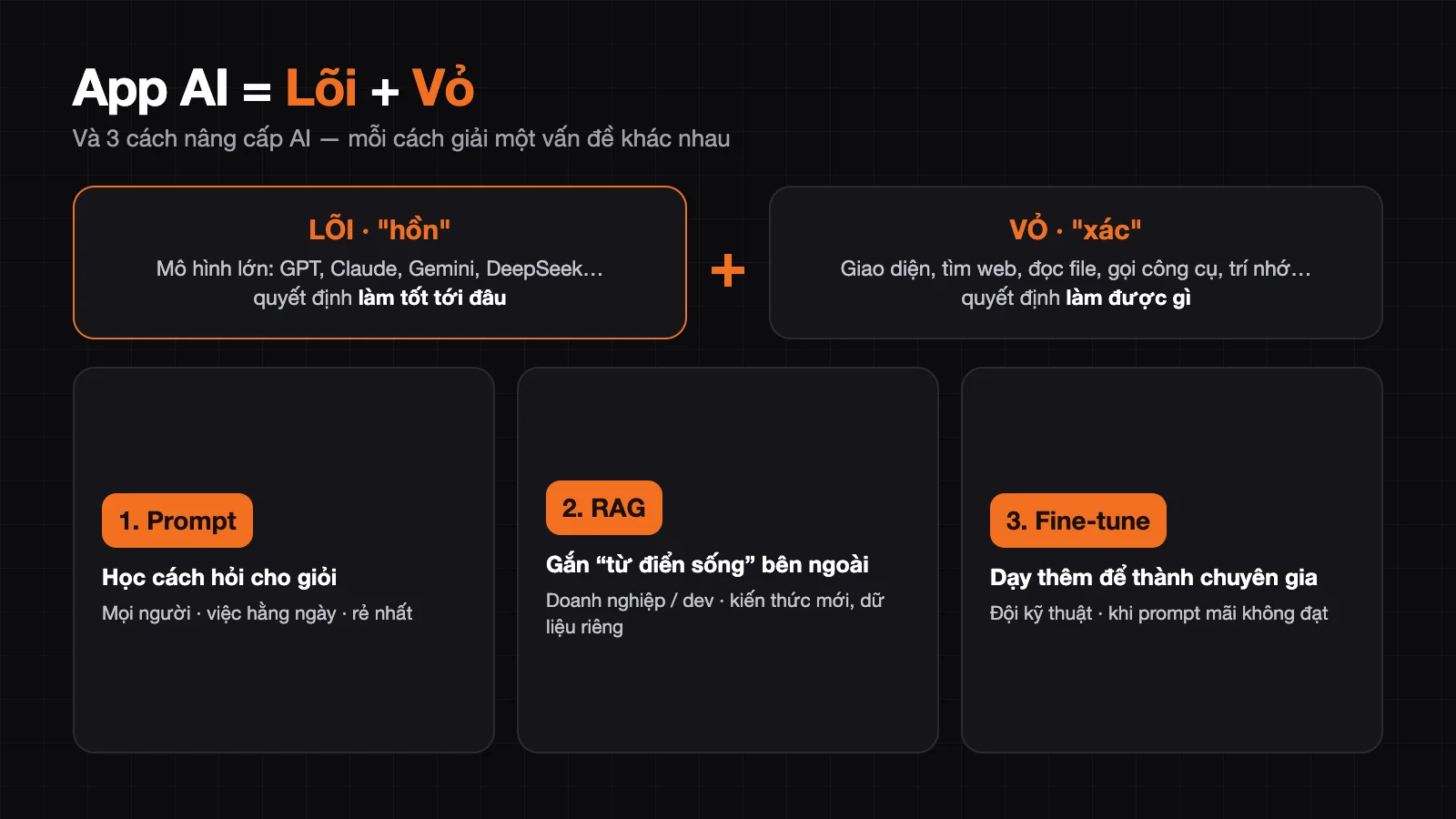
AI app = Large model (soul) + Product interface (body)
Like phones: phone makers correspond to AI apps, chip makers correspond to model makers, chip models correspond to model names and versions. The chip matters a lot, but whether the phone is good also depends on the operating system, camera, ecosystem. AI apps are the same: with the same model, two apps can give very different experiences because the "shell" is different (web search, file reading, tool calling, remembering preferences...).
Be wary of software "in disguise": a small team builds a shell then plugs in an API, advertising "using top GPT" but actually running a cheap model. Choose an app: there's no best one, only the one that fits you best — consider your real needs, acceptable costs, the model's actual power behind it, and whether the team is trustworthy.
3 ways to "upgrade" AI, and when to use which?
There are 3 ways to upgrade AI with different difficulty levels: prompt, fine-tune, and RAG. Many people ask "can I train a model?", and that's a classic misunderstanding. The three ways are:
- Prompt (command): cheapest, anyone can do it, used daily, just learn how to ask better.
- Fine-tune (tuning): lets AI "learn more" to become an expert in one field, by adjusting a small part of parameters with specialized data. This way is for technical teams, difficult and expensive.
- RAG (knowledge base): attach a "living dictionary" outside to AI; when asked, AI searches the document repository then answers. RAG solves outdated knowledge and private business data.
For example, a customer service chatbot that reads the company's product documentation is RAG. How to choose? Prompt for everyone and daily tasks, RAG for businesses needing private data, fine-tune for technical teams when prompt never works. For ordinary people, fine-tune is the most distant and not yet needed.
Choose an AI model that fits you by which criteria?
There's no "best" model, only the best fit, and there are five criteria to compare. According to longjing's teaching materials, these criteria include:
- Do you need to "break through barriers": many international models like those from OpenAI, Anthropic or Google are not easy to access in Vietnam.
- Price: international models usually start from 20 USD/month ($20), and if you plug in APIs then cost is a big deal.
- Speed: the more a model "thinks deeply" the slower it is; simple tasks need a fast model.
- Context length: determines how deep you can discuss before AI forgets. Long context doesn't mean good memory. The tip is to regularly ask AI to summarize conclusions and save to documents.
- Field strength: each model excels at writing, code, reasoning, or analyzing long documents differently.
The real way to check is to build a set of "test cases" with a few scenarios you use regularly, then each time a new model appears, test again. At this stage no single model meets everything, so keep a few models in hand.
Part 2 — Prompt: the bridge between you and the AI "brain"
What is the original prompt formula?
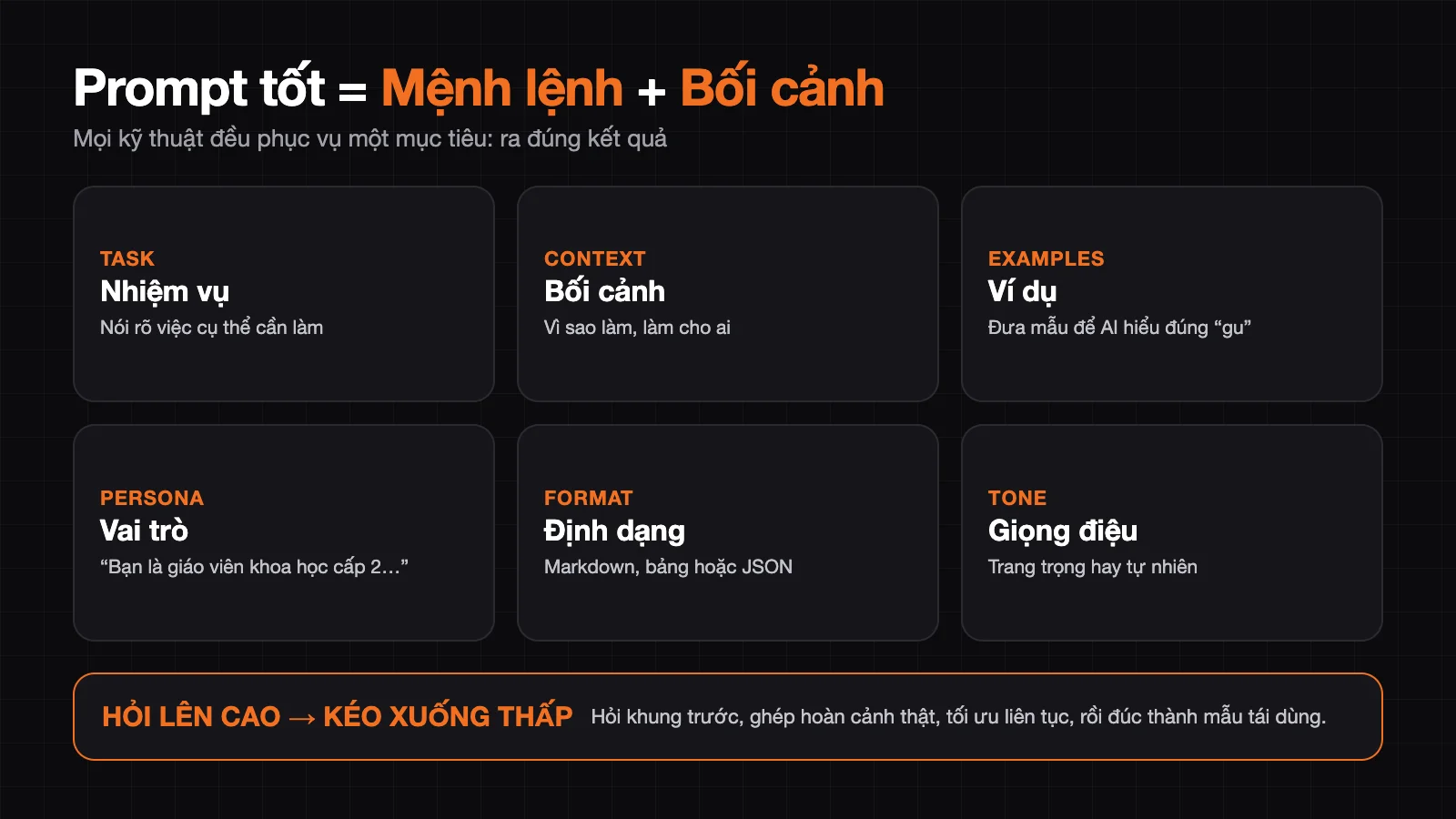
The original prompt formula is: quality prompt = clear command + necessary context. The command is the soul of the prompt: it says clearly what you want the AI to do, how to do it, and what standard to meet. Context is background information that helps the AI understand correctly.
For example, instead of "write me a phone introduction post", write: "Gaming phone for young people, price range around 3 million đồng, strengths are fast charging and heat dissipation; write an introduction post emphasizing gaming performance and reasonable price, youthful tone but not over-the-top, under 800 words." The second sentence has a command, context, tone, and length limit, so ChatGPT or Claude both give much more accurate results.
Is "prompt engineering dead"?
No. Reasoning models (like DeepSeek R1) make many people say you just need to "be clear". True, but: (1) not everyone can be clear, and (2) AI isn't a person anyway — being clear to it still takes a bit of technique. Prompt hasn't died — it's "democratized": ordinary people can use it in natural language, while professionals still use more sophisticated prompts. And the stronger the model gets, the more we don't need to write one perfect prompt from the start — we can have back-and-forth conversations like talking with a colleague.
What are the 6 techniques for writing effective prompts?
The six techniques for writing effective prompts are task, context, examples, persona, format, and tone. According to longjing's curriculum, specifically:
- Task: state the specific work clearly, like "write a popular science article about plastic waste harm", not "write something".
- Context: let the AI know why you're doing this and who it's for.
- Examples: give a few samples so the AI understands your "taste"; this is a great trick for scenarios and captions.
- Persona: "Assume you're a middle school science teacher, explain in simple language".
- Format: request Markdown, tables, or JSON for easy reuse.
- Tone: formal for reports, natural for social media.
You don't have to use all 6. Every technique serves one purpose: getting the right result.
My method: "Ask high, pull low"
New people often learn all the techniques but still go blank facing the chat box. Here's how to get unstuck:
- Step 1 — Ask high: don't ask right away "give me a gym plan". Ask the frame first: "I want to do X but have no starting point, can you help me list the framework I need to consider for this work?"
- Step 2 — Pull low: based on the frame the AI returns, blend your actual situation into it to make a specific prompt.
- Step 3 — Optimize continuously: if not satisfied, keep adjusting, keep talking until you get there.
- Step 4 — Cast a reusable frame: summarize it yourself into a prompt template for next time.
Magic sentence pattern: "I want to do work XX but have no starting point, can you help me build a framework for this?"
Two "lazy but smart" tips
- Start by imitation: like learning to write requires reading model texts — look at good people's prompts, analyze the structure, understand why they did it that way, then modify to your needs.
- Use AI to write prompts: my main strategy is to "just say it": "I want to do XXX, write me a prompt." Or tell it to mimic: "Mimic the structure and tone of this prompt, write me one about YYY." Don't demand perfection right away — let AI give you a 60-point version then iterate.
Part 3 — What is Agent (artificial intelligence agent)
Core difference
Agent is AI that can self-plan steps, call tools, and execute toward your goal. Regular chat: AI gathers, organizes data, then you manually dump into Excel. Agent: you state the goal — "survey market X, create Excel table" — it finds, analyzes, creates the file and hands it to you. The final step you used to do manually, Agent now does within its granted permissions.
Why are Agent tools mushrooming everywhere?
Like Lark / DingTalk / WeCom all being "team collaboration software" just from different vendors — when a product form gets market acceptance, vendors rush in to make it. Many tools have different names but solve the same problem, interact the same way, and have similar underlying logic.
3D framework to recognize any new Agent?
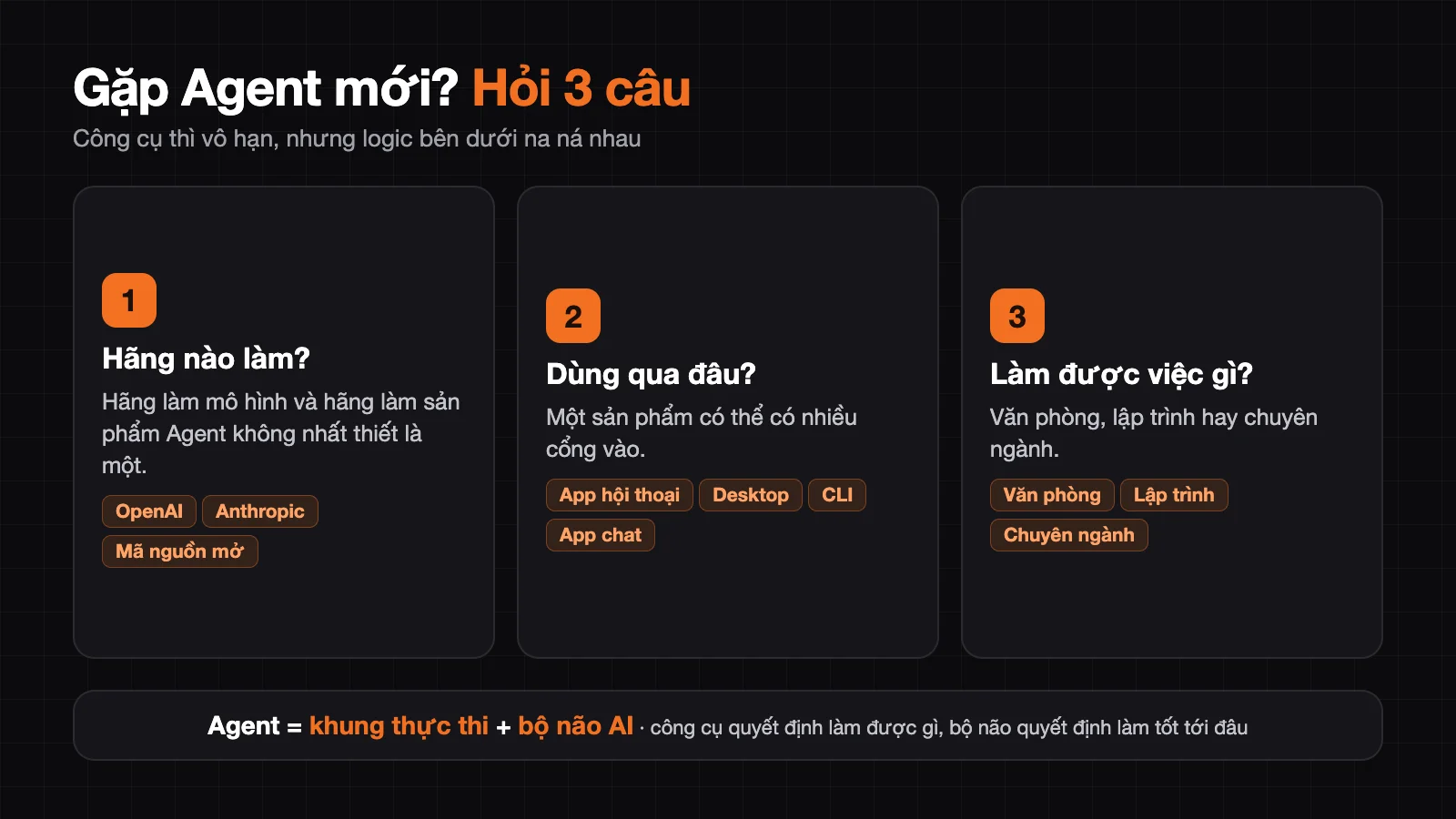
The 3D framework is three questions to recognize any new Agent: which company made it, how you access it, and what it can do. First is which company made it, like OpenAI, Anthropic, big companies or open-source communities; the company that makes the model and the company that makes the Agent product aren't necessarily the same. Next is how you access it, which has four forms: chat app (ChatGPT), desktop interface (easiest for regular people), command line CLI (Claude Code, Codex CLI), and through chat apps like Telegram or Zalo. Last is what it can do: general office Agent (write documents, analyze data, make slides), programming Agent (read code, fix bugs, run tests), or specialized Agent. These forms aren't mutually exclusive, and one product can have multiple entry points.
Underlying logic: Execution architecture + AI brain
Every Agent is really the same structure: execution framework (read files, run commands, call tools) + a large model as brain. The only difference is in two points: what tools the execution framework can call, and which model you plug in as the brain.
Tools decide what you can do. Brain decides how well you can do it.
Which Agent is best?
This question is meaningless without specific needs. The right approach has three steps. First, identify your real work. Next, choose a tool but don't rush to buy a plan; test with 2–3 real tasks. Finally, evaluate using five questions: Does the Agent complete the work or just suggest, how accurate are results and how much do you need to fix, how much time does it take or what's the standard, does it support the software you need, and what permissions does it need with data security risks. A truly good Agent is one that completes work consistently and efficiently, not one that looks smart. For example, if you want Claude Code or Codex to clean a folder with 100 files, try that exact task before paying.
Part 4 — Getting hands-on: roadmap for zero-start
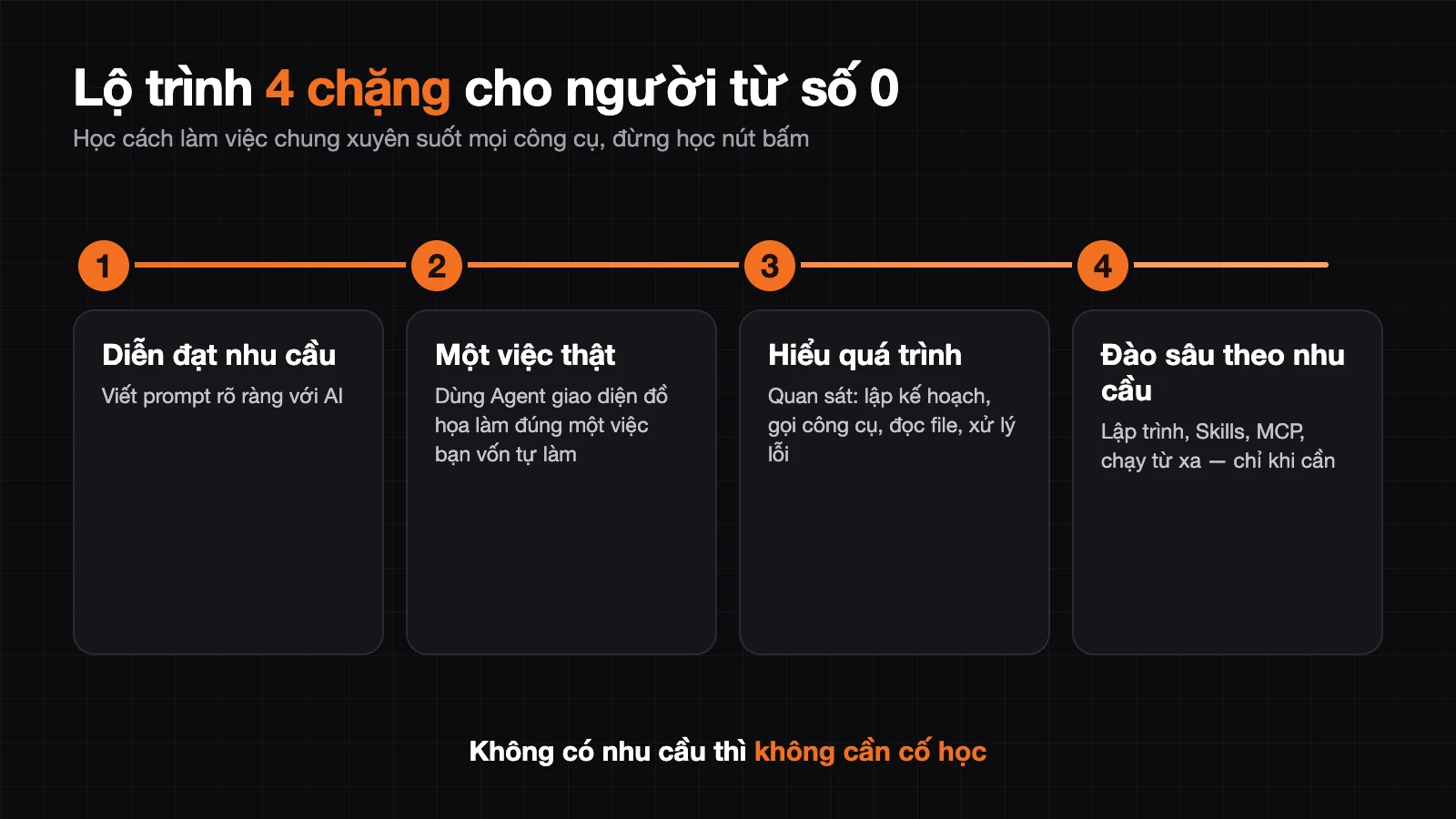
Don't force yourself to learn each tool's interface — today a button, tomorrow it moves. Learn instead the shared way of working across all tools, in 4 stages:
- Know how to express your needs to AI — already learned in the prompt section.
- Use one Agent with graphical interface for one real task — make it do exactly one thing you used to do yourself (clean files, make Excel, write report). Don't demand complex automation right away.
- Understand the execution process — watch how it plans, calls tools, reads files, handles errors. Through this you grasp the relationship between model – tools – permissions – context.
- Dig deeper based on real needs — want to build software, learn programming Agent; want Agent to have more specialized ability, explore Skills, MCP, tool connection; need to run remotely/schedule, research further. No need to learn if you have no need.
When starting, pay attention to just 3 things: choose work space (one folder to keep all products neat), set permissions (newcomers should grant broad permissions to avoid approving each step — for sensitive data, reconsider), choose model (start with free/cheap model, upgrade when you see it won't do — rough but effective rule: higher price usually means higher performance).
Conclusion: AI is not about learning well, but about using it well
Four pieces are enough:
- Large models: understand the essence, how they work, strengths and weaknesses.
- Prompt: techniques and methods of talking to AI.
- Agent: a framework for recognizing every new tool.
- Practice: completing your first real task.
Three core things to remember:
- AI is a tool, not magic — know its boundaries.
- The essence of a prompt is stating your need clearly — not memorizing formulas.
- Current agents aren't truly "intelligent" — but they already solve many real problems, the key is finding the right place to use them.
Don't fall into an endless loop of learning. Jump into using it, making mistakes, fixing them, solving the work sitting on your desk. Each time you get stuck, each time you adjust, you'll understand AI one layer deeper.
From today, make AI a daily tool: write weekly reports, organize documents, learn something new, make plans, analyze data — try asking AI about everything first.
This post draws inspiration from the curriculum "Understand AI from Zero in 2 Hours" by the author 龙井 (longjing), rewritten and adapted for the Vietnamese context.
Translated from Vietnamese with AI. Read the original.
Want to apply this in your business?
Book a free 30-minute call (Vietnam time, in English or Vietnamese).