

Using Antigravity, Claude Code and Codex in one system is how one person divides work among three programming agents from three companies (Google, Anthropic, OpenAI) with clear roles: one coordinating agent maintains the big picture, executing agents fix code in the right project and the right machine assigned to them, all reading the same rulebook and one status file. This post does not rank the three tools, does not promise time or money savings because OPCAIOS has not measured, and the role division is our convention, not a recommendation from any company. The comparison table comes from official documentation of each side and from --help of each CLI, read on 03/11/2026. Dividing work between two agents already exists in the post using Codex and Claude Code at the same time; this post focuses on where Antigravity differs and its role in the three-agent setup.
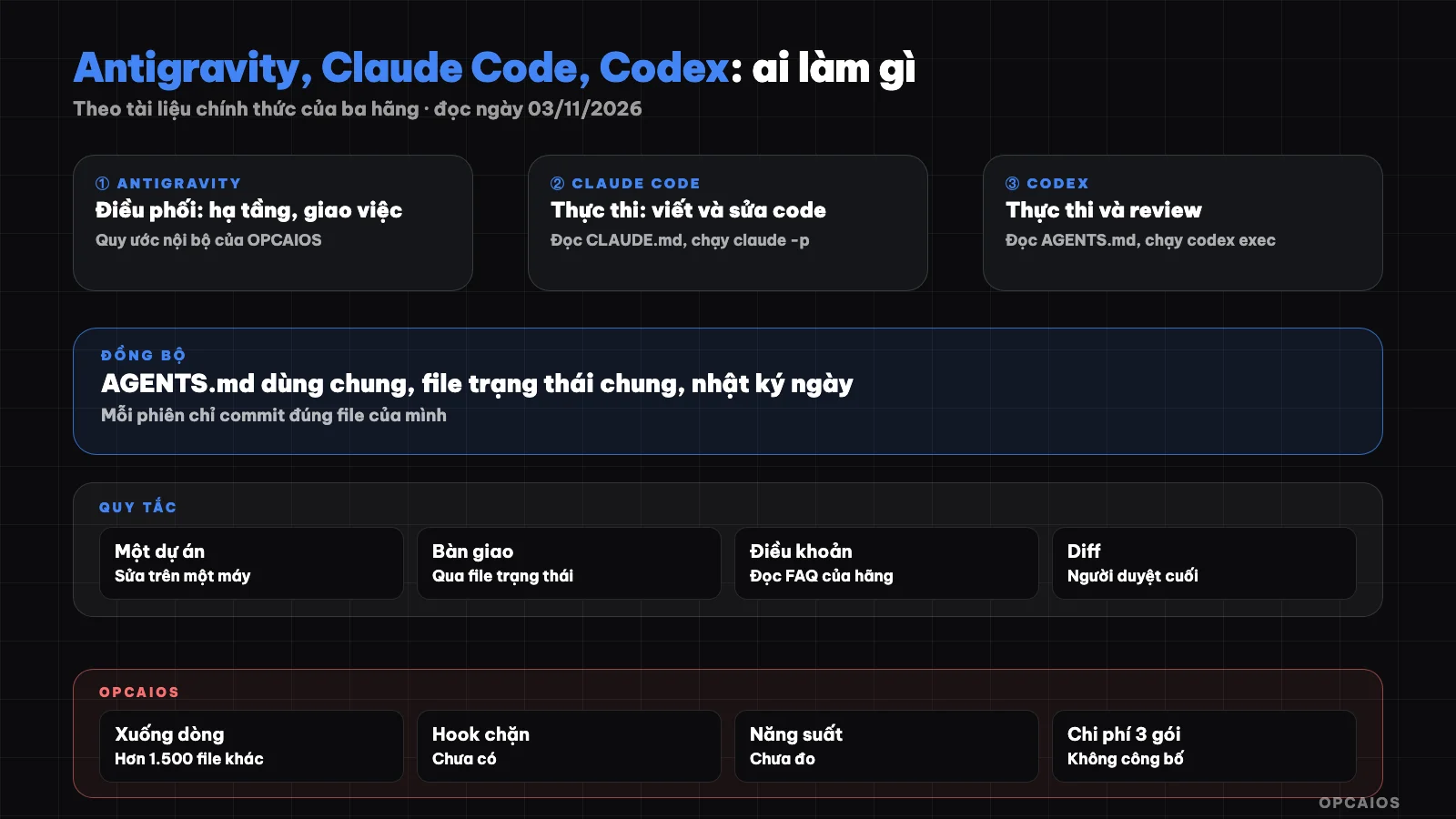
One coordinating agent, executing agents, one rulebook and one shared status file. Diagram: OPCAIOS.
How are a coordinating agent and an executing agent different?
A coordinating agent is the agent that maintains the system-wide picture: reads status, checks services, divides work, tracks assigned tasks and records results; an executing agent is the agent that receives a specific task in a specific project, fixes code, runs tests, commits and reports back. This is an OPCAIOS convention, not a feature of any company: all three tools can fix code and run commands, so the role is set by the owner. Reasons for separating roles:
- One place holds shared context: knows which service is failing and who holds which task.
- One owner for each project: reduces two agents editing on top of each other.
- Easy to trace errors: knows immediately which session, which machine made the fix.
Comparison table of three tools' roles by official documentation
The table below only records facts seen in documentation or --help on 03/11/2026; the last column is how OPCAIOS is using it, not a quality judgment:
| Criterion | Google Antigravity | Claude Code | Codex |
|---|---|---|---|
| Interface | Antigravity app, Antigravity IDE, CLI agy, plugins for other IDEs |
Terminal, VS Code, JetBrains, desktop app, web | ChatGPT app (desktop, mobile, web), Codex CLI, IDE plugins, Codex Cloud |
| Model | Gemini, Claude, GPT-OSS depending on plan (/docs/models) | Claude; CLI and IDE plugins support additional third-party providers | Models from OpenAI |
| Instruction file | AGENTS.md or GEMINI.md, cumulative across all levels |
CLAUDE.md; reads AGENTS.md when no CLAUDE.md |
AGENTS.md, from user directory down to project |
| Run non-interactively | agy -p |
claude -p |
codex exec |
| Separate working directory | App supports worktree; child agents can run on their own worktree | Flag -w, --worktree |
Flag --worktree |
| Role at OPCAIOS | Coordinating | Executing | Executing, review |
The core post What is Antigravity has an introduction section to the app, IDE and CLI if you are new to this tool's name.
How is Antigravity different from Claude Code and Codex?
Antigravity differs from the other two tools in five points that affect how I integrate systems, according to the documentation at antigravity.google read on 03/11/2026. No point says Antigravity is stronger or weaker; they just change how rules are set and work is divided:
- Cumulative rules: per /docs/rules, Antigravity reads
AGENTS.mdorGEMINI.mdin the working directory and parent directories up to the repository root, adds global rules, then merges them all. Claude Code prioritizesCLAUDE.md. - Multiple model families: Gemini, Claude, or GPT-OSS depending on the plan, see the post choosing a model in Antigravity.
- Built-in sub-agents: /docs/subagents lists
research,browser, andself;browserruns a browser in a sandbox, called with/browser. - Agent teams: the
/teamworkcommand for multi-day projects, only in paid plans. - Login terms: /docs/faq says using third-party software (mentioning Claude Code) to access Antigravity with an Antigravity account violates the terms, and wrapping
agy -pinside a third-party agent is not supported on personal plans.
The fifth point is most important: don't have Claude Code or Codex call Antigravity as a "tool" using a personal account. The three tools work together through shared files, each logging in with its company's account.
Why is Antigravity given the coordinator role in the OPCAIOS system?
Antigravity is given the coordinator role in the OPCAIOS system because how Antigravity is built for organizing work fits with watching many areas at once, not because I measured it as better. Per documentation read on 03/11/2026, the app can run many agent conversations in parallel, the main agent can call many sub-agents at once and track them in a separate table, and every plan has scheduled tasks. The coordinator agent's work includes:
- Check infrastructure and read the state file at session start.
- Assign work by writing tasks, projects, machines, and main agents to the state file.
- Track results, update incidents and logs.
Claude Code and Codex also have sub-agents, scheduled runs, and non-interactive mode, so swapping roles is fine. What matters is only one coordinator agent at a time, or the state file will have two conflicting plans.
How should a shared AGENTS.md be set up for the three agents?
AGENTS.md is a shared file that all three tools can read, but each tool looks for it its own way. Per documentation read on 03/11/2026: Codex reads AGENTS.md in the user's Codex directory then from the project root down; Claude Code reads AGENTS.md when there is no CLAUDE.md, or when CLAUDE.md imports it; Antigravity reads AGENTS.md or GEMINI.md and merges them, with global rules at ~/.gemini/GEMINI.md or ~/.gemini/AGENTS.md. Layout suggestions:
- Common rules (what to read at session start, what to write at session end, who edits which project) write once in
AGENTS.md. CLAUDE.mdonly imports@AGENTS.mdplus Claude Code's own section.GEMINI.mdkeep very short, since Antigravity merges it withAGENTS.md; if the two files say different things the agent gets both conflicting commands.
Detailed syntax is in the post what is AGENTS.md; Antigravity's directory-style rules .agents/rules/ are in the post rules and workflows in Antigravity.
Why "one project edits on one machine only"?
"One project edits on one machine only" is a rule that each code repository is edited and deployed from exactly one machine, even if the system has many machines and many agents. This rule came from a real glitch I hit: when one agent deployed a website from a Windows machine, the diff showed over 1,500 files different just from line endings (Windows uses CRLF, macOS and Linux use LF). False changes hid real changes, and another agent might commit them by mistake. With the trio, the risk is higher because the coordinator agent and execution agent are usually on different machines. The rule applies:
- Each code repository notes its server in
AGENTS.mdand the state file. - Only assign edits to that repository to the agent on that exact machine.
- To switch machines, change the state file first.
How to normalize line endings with .gitattributes is in the post many AI sessions editing one project.
How Does a Shared Status File Help Hand Off Between Coordinator and Executor?
A shared status file is the handoff channel between coordinator agent and executor agent, because the three tools don't share memory and shouldn't call each other using personal accounts. One task line records four things enough:
- The work to do, described in one sentence.
- The project and machine being fixed.
- The agent in charge and when the task was assigned.
- Status: in progress, done, stuck, with the actual check time.
For example, not real people: the coordinator agent sees an error on the registration page, writes one task line to Claude Code on the machine that keeps the website repo; that Claude Code session reads the line, fixes it, commits the right file, writes "done" with test results; the next coordinator session checks the real page again before closing the incident.
OPCAIOS Experience
OPCAIOS is the website opcaios.org run by one person using AI agents. These things are real, checked on 03/11/2026:
- The main Mac has Antigravity app version 2.28.x, Antigravity IDE version 2.5.x and CLI
agyversion 1.4.12, used side by side with Claude Code and Codex. - Antigravity keeps the coordinator role: manage infrastructure, assign and track tasks. It also did some admin features for the website, like tracking Dream 100 targets on Facebook and X, and editing the website menu.
- The website code has a rule to only edit and deploy from a different machine (Windows machine), after one time saw over 1,500 different files because of line break style.
- The machine has over 400 saved Antigravity conversations locally (counted folders, didn't read content).
GEMINI.mdat user level has only one line: always reply in Vietnamese. General rules are inAGENTS.mdin the user's root folder and in the Obsidian notes repo.- The Antigravity app declares 14 MCP servers; hooks only report session status so far, no command-blocking hooks; the only global workflow is an empty template; haven't seen any knowledge item created yet.
- Haven't used Antigravity SDK, haven't used Remote Control, haven't used
/teamwork, and haven't measured the productivity of this role split.
Frequently Asked Questions
Do I need to use all three tools?
No. The three tools are OPCAIOS's choice, not a requirement to do OPC. One agent used skillfully, with AGENTS.md, with the habit of committing the right files and reading diffs, is enough for most of the work of someone working alone. Only add tools when there's a specific reason, like needing a limit from a different plan or another person to review from a different company. Each additional tool means an additional plan fee and another set of rules to keep in sync.
Can I use an Antigravity account with Claude Code?
No. The /docs/faq page of Antigravity as read on 03/11/2026 states that using third-party software, mentioning Claude Code by name, to access Antigravity with an Antigravity account violates the terms and can result in account lockout. Google suggests using an API key from Gemini Enterprise or Google AI Studio if you want a third-party agent to use Gemini. That page also says wrapping agy -p inside a third-party agent is not supported with the personal plan. This is a description of the terms, not legal advice.
Does Antigravity read AGENTS.md like Codex does?
Yes, it reads it, but merges it differently. According to /docs/rules as read on 03/11/2026, Antigravity finds AGENTS.md or GEMINI.md in the working directory and parent directories up to the repository root, plus global rules, then merges everything into the prompt. It does not read rules from subdirectories below the working directory. Because it combines, if GEMINI.md and AGENTS.md say different things, the agent receives both, so keep shared rules in a single file.
Should the orchestrating agent fix code itself?
Yes, but only when that work is recorded in the status file like any other work, and only on the correct machine that is allowed to edit that project. At OPCAIOS, Antigravity once directly fixed admin features and the website menu. The risk is that the orchestrating agent gets used to fixing on its own machine, breaking the "one project one machine" rule. When doing it themselves, the orchestrating agent records itself as the owner of that work.
Where should a newcomer start with combining three tools?
Start with rules, not tools. Write a shared AGENTS.md, a short status file, and define which machine each project is edited on. Use one agent until the habit of reading status and writing logs runs smoothly, then add a second agent in a review role that only reads, finally separate the orchestration role. To learn how to set up a multi-agent process with controls, see AI Application Training from OPCAIOS.
Source: Google Antigravity documentation at antigravity.google (/docs/rules, /docs/subagents, /docs/teamwork, /docs/agent, /docs/models, /docs/plans, /docs/faq), Claude Code documentation at code.claude.com (overview page, memory), Codex documentation at learn.chatgpt.com (overview page, AGENTS.md), agy --help 1.4.12, claude --help 2.1.317, codex --help 0.162.1; read on 03/11/2026. Unverified: the effectiveness of splitting orchestration and execution roles, cost when using three plans in parallel, Antigravity CLI worktree capability; features may change by version. Experience is from OPCAIOS.
Translated from Vietnamese with AI. Read the original.
Want to apply this in your business?
Book a free 30-minute call (Vietnam time, in English or Vietnamese).