

API (Application Programming Interface) là "cửa giao tiếp" để hai phần mềm nói chuyện với nhau mà không cần con người ngồi giữa: phần mềm bán hàng gửi đơn sang phần mềm kế toán, ngân hàng báo tiền về cho website, ứng dụng của bạn gọi ChatGPT của OpenAI hay Claude của Anthropic để viết nội dung. Hiểu API là bước đầu để tự động hoá công việc, vì gần như mọi công cụ tự động hoá như n8n, Make, Zapier hay AI agent đều chạy trên API. Bài này giải thích API bằng ngôn ngữ đời thường, kèm ví dụ thật từ website opcaios.org đã kiểm tra ngày 22/10/2026. Đầu tiên là khái niệm, tiếp theo là cấu trúc một lần gọi, cuối cùng là bảo mật.
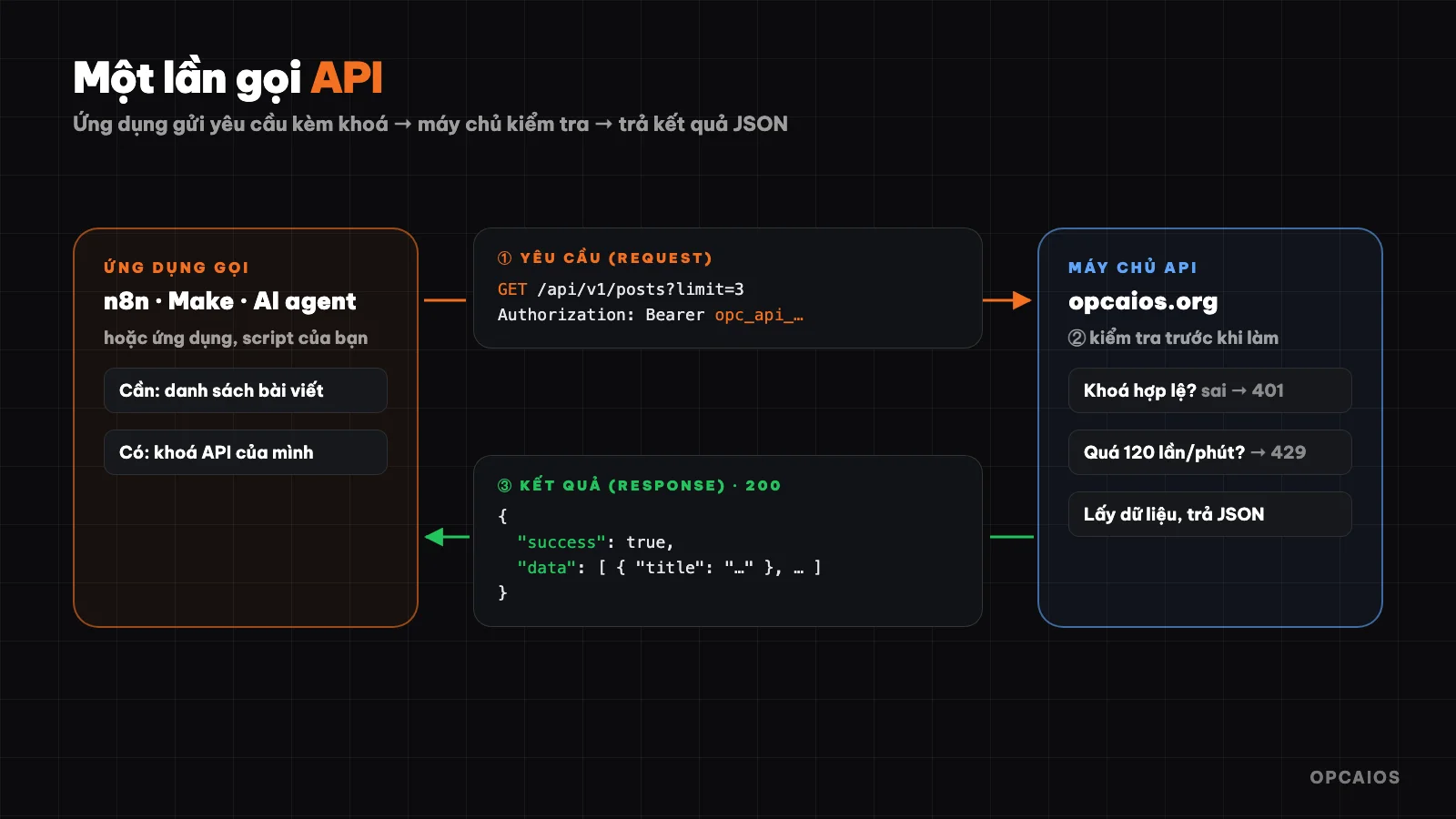
Một lần gọi API: ứng dụng gửi yêu cầu kèm khoá, máy chủ kiểm tra rồi trả kết quả. Sơ đồ: OPCAIOS.
API là gì?
API là cửa giao tiếp có quy tắc rõ ràng giữa hai phần mềm, và cách dễ hiểu nhất là hình dung một nhà hàng. Bạn (khách) không vào bếp tự nấu mà gọi món qua người phục vụ, người phục vụ mang yêu cầu vào bếp và mang món ra. Bạn không cần biết bếp nấu thế nào, chỉ cần gọi đúng món trong thực đơn. API chính là người phục vụ đó:
- Khách là phần mềm cần dữ liệu hoặc cần làm một việc, như ứng dụng của bạn, một quy trình n8n hay một AI agent.
- Bếp là hệ thống đang giữ dữ liệu hoặc khả năng, như ngân hàng, phần mềm bán hàng hay mô hình AI của OpenAI.
- Thực đơn là tài liệu API: liệt kê những yêu cầu được phép, cần gửi gì và sẽ nhận về gì.
Nhờ API, mỗi phần mềm giữ kín cách làm bên trong, nhưng vẫn mở ra một cửa có quy tắc cho phần mềm khác dùng. Ví dụ, website opcaios.org mở API riêng năm 2026 để n8n đọc danh sách bài viết mà không cần đăng nhập vào trang quản trị.
Một lần gọi API gồm những gì?
Một lần gọi API là một yêu cầu HTTP, cùng giao thức trình duyệt dùng để mở trang web, và phần lớn API ngày nay là web API như vậy. Theo API của opcaios.org (2026), một lần gọi gồm năm thành phần, và khi thiếu khoá thì máy chủ trả mã 401:
| Thành phần | Ý nghĩa | Ví dụ |
|---|---|---|
| Endpoint | Địa chỉ của "món" bạn gọi | https://opcaios.org/api/v1/posts |
| Method | Bạn muốn làm gì | GET lấy dữ liệu, POST tạo mới, PATCH sửa, DELETE xoá |
| Header | Thông tin đi kèm, quan trọng nhất là khoá xác thực | Authorization: Bearer <khoá> |
| Body | Dữ liệu gửi lên (khi tạo hoặc sửa) | {"fullName": "Nguyễn Văn A", "phone": "09…"} |
| Response | Kết quả trả về, thường ở dạng JSON, kèm mã trạng thái | 200 thành công, 401 thiếu khoá, 429 gọi quá nhiều |
JSON là định dạng dữ liệu dạng "tên: giá trị" mà cả người lẫn máy đều đọc được. Ví dụ khi gọi API của opcaios.org mà không gửi khoá, máy chủ trả về mã 401 cùng nội dung:
{"success": false, "error": "Thiếu token. Tạo token trong Admin → Cài đặt → API token."}
Khoá API (API key, token)
Khoá API giống thẻ ra vào: máy chủ nhìn khoá để biết ai đang gọi và được làm gì. Có khoá chỉ đọc, có khoá được ghi. Ai cầm khoá là có quyền như chủ khoá, nên khoá API phải được giữ như mật khẩu.
Giới hạn số lần gọi (rate limit)
Rate limit là giới hạn số lần gọi API trong một khoảng thời gian để máy chủ không bị quá tải. Hầu hết API đều có giới hạn này. Ví dụ API của opcaios.org cho mỗi khoá tối đa 120 lần mỗi phút; vượt quá sẽ nhận mã 429 và phải thử lại sau. Với một quy trình n8n chạy mỗi sáng, 120 lần mỗi phút thường đủ, nhưng một vòng lặp lỗi có thể chạm giới hạn trong vài giây. Vì vậy hãy đọc trang tài liệu về giới hạn của OpenAI, Google hay Anthropic trước khi chạy tự động, vì mỗi nhà cung cấp đặt mức khác nhau.
How Are APIs Different From Webhooks?
An API is how you actively ask another system a question, while a webhook is how that other system actively tells you something. Asking constantly takes effort, asking rarely is slow, so you need to tell the two apart:
- API: you ask "any new orders?" on your own schedule.
- Webhook: the other system tells you "new order just came in", you just need to give them a URL address.
A real example, based on opcaios.org source code (checked 22/10/2026): when a customer transfers money to buy a course, SePay (a bank transaction tracking service) sends a webhook to the website. The website checks the secret key in the request, matches the transfer details with the order code, unlocks the course for the customer and notifies the site owner, so nobody has to sit and reconcile bank statements. Finally, the website replies with 200 so SePay knows it was received and won't send it again.
Where Are APIs Used in Daily Work?
APIs are used in four groups of common tasks, and nearly every automation tool calls at least one of them. First is payment: payment gateways and SePay report completed orders via webhook. Next is sales and customer care: a form on the website sends prospects into a CRM, then the CRM sends messages via the Zalo OA or email API.
- Advertising and reporting: pull spending data from Meta Ads and Google Ads into Google Sheets each morning.
- AI: an app calls the API of OpenAI, Anthropic or Google to write, summarize, classify. Most AI APIs charge by the amount of text (tokens) sent and received, so you need to set a spending limit from the start.
For example, a small shop can connect an order form to Google Sheets via n8n, so each new order automatically becomes a row in the spreadsheet without anyone typing it in by hand. This example is an illustration of OPCAIOS.
Can You Use APIs If You Don't Know How to Code?
Yes, people who don't know how to code can still use APIs thanks to drag-and-drop automation tools, because these tools do the technical part for you. Three common tools are:
- n8n: open source, you can install it on your own server, has an "HTTP Request" node to call any API.
- Make and Zapier: online services, come with thousands of pre-built connections.
The common process has four steps. First, pick a trigger event like a new form, a webhook arriving or 8 AM. Next, add a step to call the API. Then, paste the endpoint and key and link the data by mouse. Finally, for an API that doesn't have a pre-built connection, use the "HTTP Request" step and read the API documentation to learn the endpoint, method, body.
Real Example: What Endpoints Does the opcaios.org API Have?
The opcaios.org API is a REST API at https://opcaios.org/api/v1, open to connect with n8n, Make, Zapier or your own script. According to the opcaios.org Admin (checked 22/10/2026), the site owner creates a key then picks read-only or read-and-write permissions. Some endpoints:
| Method | Endpoint | What It Does |
|---|---|---|
GET |
/api/v1/posts |
List of posts |
POST |
/api/v1/posts |
Create a post (draft by default) |
GET |
/api/v1/submissions |
Forms left by visitors |
POST |
/api/v1/contacts |
Add a prospect to the CRM |
POST |
/api/v1/links |
Create a shortened opcaios.org/go/… link |
Try calling it with the curl command (replace the key with your real key):
curl https://opcaios.org/api/v1/posts?limit=3 \
  -H "Authorization: Bearer opc_api_xxxxxxxx"
The result always comes back in the form {"success": true, "data": …} or {"success": false, "error": "…"}, so automation tools can easily check if it worked or failed.
How Are APIs and MCP Different?
MCP is a standard that lets AI assistants use outside tools, and the endpoints above also appear in the MCP server of opcaios.org with the same operations. The difference is in who uses it:
- API is for software and people writing workflows: you know ahead of time which endpoint you'll call, in what order.
- MCP is for AI: MCP packages the operations as "tools" with descriptions, so AI assistants like Claude from Anthropic or ChatGPT from OpenAI pick and call whichever one they want during the conversation.
The MCP server usually calls the API underneath. For example, when you say "create a draft post about webhooks", the assistant calls the MCP tool, and that tool calls POST /api/v1/posts. Read the post What is MCP? to see how these two connect.
Security Notes When Using APIs
- Don't paste API keys in public places: source code pushed to GitHub, screenshots, group messages, chat windows with AI.
- One key per job, minimum permissions: if a process only needs to read, use a read-only key. If one key leaks, revoke just that key.
- Webhooks must authenticate: verify the secret key or signature in each incoming request, otherwise anyone can pretend "the order has been paid."
- Set spending limits for paid APIs: especially AI APIs — one error loop can make thousands of calls in minutes.
- Keep logs: record each important call so you know what happened if something goes wrong.
Frequently Asked Questions
Do APIs cost money?
It depends on the provider. Many APIs are free within certain limits, but AI APIs and data APIs usually charge by usage, for example OpenAI, Anthropic and Google all charge per token. Since prices change over time, check the official pricing page before connecting to an automated workflow. First set a spending limit, then test with a few dozen calls, only then turn on scheduled runs. This post doesn't mention specific prices because OPCAIOS hasn't verified the pricing tables of these providers.
What is REST API?
REST is the most common way to design APIs: each type of data has its own address, for example /posts or /contacts, and you use HTTP methods GET, POST, PATCH, DELETE to fetch, create, edit, delete. For example, the opcaios.org API uses GET /api/v1/posts to get a list of posts and POST /api/v1/posts to create a new draft. Thanks to this consistent naming rule, someone writing a workflow in n8n, Make or Zapier can guess other endpoints without learning from scratch.
Where do I get an API key?
API keys are in the settings or developer section of the service you want to connect to, usually named "API keys", "Developer" or "Integration". With opcaios.org, the site owner creates keys in the admin panel and chooses read-only or read-and-write permissions. A key should only have the minimum permissions for one job, and must be kept like a password: don't paste it into public source code, screenshots or chat windows with AI.
API or webhook, which should I use?
If you need to know right away when something happens like a new order or payment received, use webhook if the service supports it. If you need to fetch or send data on a schedule, or when you actively choose to, use an API. Most workflows use both: a SePay webhook tells you money arrived, then an internal API unlocks the course for the customer. This example comes from how opcaios.org handles course orders.
Do I need to learn programming to use APIs?
Not required. With n8n, Make or Zapier, you only need to understand endpoints, methods, keys and JSON at a reading level, exactly what this post explained. If you want to learn how to apply AI and automation for small teams, see the AI application training course.
Source: actual source code and responses from the opcaios.org API (/api/v1, SePay webhook), verified on 22/10/2026.
Translated from Vietnamese with AI. Read the original.
Want to apply this in your business?
Book a free 30-minute call (Vietnam time, in English or Vietnamese).