

Webhook là gì?
Webhook là cách một phần mềm tự báo cho phần mềm khác ngay khi có chuyện xảy ra: có đơn hàng mới, khách vừa chuyển khoản, có người điền form trên website. Thay vì cứ vài phút lại hỏi "có gì mới không?", bạn đưa cho hệ thống nguồn một địa chỉ URL, và hệ thống nguồn gửi dữ liệu tới địa chỉ đó đúng lúc sự kiện xảy ra. Bài này giải thích webhook bằng ngôn ngữ đời thường, cách nhận và gửi webhook an toàn, kèm ví dụ thật từ website opcaios.org, nơi webhook của SePay và webhook gửi đi cho n8n đang chạy. Đầu tiên là khái niệm, tiếp theo là hai ví dụ, cuối cùng là chữ ký và các lỗi hay gặp.
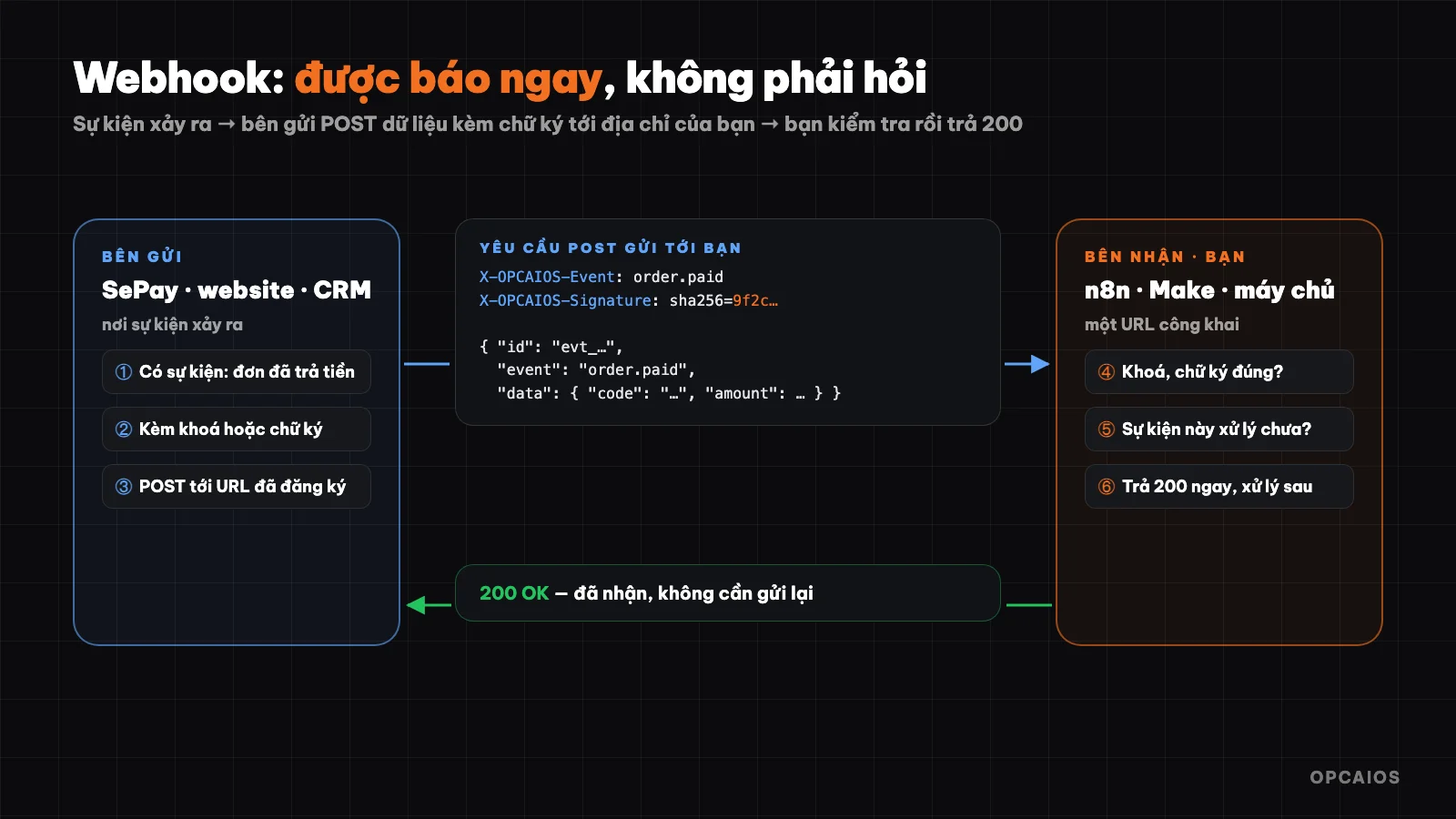
Một lần gửi webhook: có sự kiện → gửi dữ liệu kèm chữ ký → bên nhận kiểm tra rồi trả 200. Sơ đồ: OPCAIOS.
Webhook là gì?
Webhook là một yêu cầu HTTP POST mà hệ thống nguồn gửi tới địa chỉ URL bạn đã đăng ký, mỗi khi một sự kiện xảy ra. Hãy so sánh hai cách chờ hàng giao tới:
- Gọi điện hỏi mỗi 10 phút "hàng tới chưa?": tốn công, và hàng tới giữa hai lần gọi thì bạn vẫn biết chậm.
- Để lại số điện thoại, shipper tới nơi thì gọi bạn: không tốn công chờ, biết ngay lập tức.
Cách thứ nhất là gọi API theo kiểu hỏi liên tục (polling). Cách thứ hai là webhook. Ví dụ, theo SePay (2026), webhook báo giao dịch tới website ngay khi khách chuyển khoản, thay vì website phải hỏi SePay mỗi 5 phút (một chu kỳ minh hoạ).
| Gọi API hỏi liên tục | Webhook | |
|---|---|---|
| Ai chủ động | Bạn hỏi | Hệ thống kia báo |
| Tốc độ biết tin | Chậm tới một chu kỳ hỏi | Gần như ngay lập tức |
| Tốn tài nguyên | Nhiều lần hỏi không có gì mới | Chỉ gửi khi có sự kiện |
| Bạn cần có | Khoá API | Một địa chỉ URL nhận được yêu cầu từ Internet |
Webhook được dùng ở đâu?
Webhook được dùng ở mọi nơi cần biết một sự kiện ngay lập tức, và có năm nhóm phổ biến. Đầu tiên là thanh toán: SePay, dịch vụ theo dõi chuyển khoản, hoặc cổng thanh toán báo "đơn ABC đã trả tiền". Tiếp theo là bán hàng: sàn thương mại điện tử và phần mềm bán hàng báo có đơn mới hay đơn huỷ. Thứ ba là form và khách hàng: website báo có người để lại thông tin, CRM báo có khách mới.
- Lập trình: GitHub báo có mã mới được đẩy lên để chạy kiểm thử và triển khai.
- Nhắn tin: Zalo OA, Messenger và Telegram gửi tin nhắn khách hàng tới hệ thống trả lời tự động.
Ví dụ, một cửa hàng nhỏ nhận 30 đơn mỗi ngày có thể nối webhook đơn hàng với Google Sheets qua n8n, để mỗi đơn mới tự thêm một dòng vào bảng tính mà không ai phải nhập tay. Ví dụ này là minh hoạ của OPCAIOS, không phải số liệu thật.
Một webhook trông như thế nào?
Một webhook là một yêu cầu HTTP POST bình thường, có thân là JSON, và nên chứa ba phần: mã sự kiện, loại sự kiện và dữ liệu. Ví dụ webhook opcaios.org gửi đi năm 2026 khi có người điền form trên website, theo định dạng mà n8n, Make và Zapier đều đọc được:
{
  "id": "evt_3f9a1c2b7d8e4f60",
  "event": "submission.created",
  "createdAt": "2026-10-22T08:15:00.000Z",
  "data": {
    "form": "lien-he",
    "fields": { "name": "Nguyễn Văn A", "phone": "09…", "message": "Tôi cần tư vấn" }
  }
}
(Dữ liệu minh hoạ.)
Ba phần cần có trong mọi webhook: mã sự kiện (id) để chống xử lý trùng, loại sự kiện (event) để biết cần làm gì, và dữ liệu (data) chứa nội dung cụ thể. Bên nhận trong n8n, Make hay Zapier đọc 3 phần này rồi chuyển từng trường sang bước kế tiếp, thường trong vài giây.
Real example 1: How does a website receive payment webhooks from SePay?
Receiving payment webhooks is the process where a website automatically unlocks a course when SePay reports that money has arrived. According to SePay (2026), this service monitors bank transactions, and when a customer transfers money to buy a course on opcaios.org, SePay sends a webhook to the website. The website does four things in order:
- Check the key: the request must carry the correct secret key already set up in SePay. If the key is wrong, reject it; otherwise anyone could fake a "payment received" request.
- Record the transaction ID before processing: if the same transaction is sent again due to network hiccups, the next time it will be skipped and the course won't be unlocked twice.
- Match the transfer content with the order code, unlock the course for the customer and notify the site owner.
- Return
200so SePay knows it was received and won't send it again.
According to opcaios.org's webhook source code (checked on 22/10/2026), this is the template for every webhook received: verify, prevent duplicates, process, reply quickly.
Real example 2: opcaios.org sends webhooks out
The website also sends webhooks out to connect with n8n, Make, Zapier or custom systems. The site owner goes to the admin panel, pastes the receiving address and selects which events they want to listen to:
| Event | When sent |
|---|---|
submission.created |
New form submission (contact, course, newsletter, comment) |
order.created / order.paid |
New shop order / order has been paid |
contact.created |
New customer in CRM |
deal.won |
Sales opportunity closed successfully |
payment.paid |
Payment link or project collection period has been paid |
ticket.created |
New project support request |
Each webhook has its own signing key (in the form whsec_…, only shown once when created). Each time it's sent, the website includes two headers:
X-OPCAIOS-Timestamp: 1792656900
X-OPCAIOS-Signature: sha256=<HMAC-SHA256(key, "timestamp.body")>
There's a send test button (a ping event) to check the receiving address before using it for real, and the admin panel records the result of the most recent send (response code, errors if any). The receiving end must reply within 10 seconds.
How do I check a webhook signature?
A webhook signature is a code that helps the receiving end be sure the request comes from the right place and hasn't been altered in transit. The common way to do this is called HMAC: both sender and receiver keep the same secret key, the sender uses that key to "hash" the content into a signature, the receiver hashes the received content again with the same key and compares them.
According to opcaios.org's source code (2026), the example below for checking a webhook signature in Node.js rejects any request older than 5 minutes:
import crypto from "node:crypto";

function verify(rawBody, timestamp, signatureHeader, secret) {
  // Reject requests older than 5 minutes, prevent replay of stolen requests
  if (Math.abs(Date.now() / 1000 - Number(timestamp)) > 300) return false;
  const expected = "sha256=" + crypto
    .createHmac("sha256", secret)
    .update(`${timestamp}.${rawBody}`)
    .digest("hex");
  const a = Buffer.from(expected);
  const b = Buffer.from(signatureHeader || "");
  return a.length === b.length && crypto.timingSafeEqual(a, b);
}
Two details often missed:
- Use the raw request body (the string as received), not JSON that's been parsed and converted back to a string: a single space off and the signature is wrong.
- Compare using a safe function (
timingSafeEqual), not===, so an attacker can't guess the signature by measuring response time.
In n8n, you do this with a Crypto node (HMAC) then an IF node to compare with the header; or use the built-in authentication option on the Webhook node if the sender uses a static key.
Receive webhooks without coding
- In n8n, Make or Zapier, create a workflow starting with a Webhook step — the tool will give you a URL address.
- Paste that address into the webhook settings of the sending system (SePay, website, CRM…), choose the event.
- Click send test so the tool receives a sample of the data, then link the fields to the next step: add a row to Google Sheets, send a Telegram message, create a customer in your CRM.
- Turn on the workflow. From now on each event will run automatically.
What are the common webhook errors?
There are five types of common webhook errors, and each one can cause events to be lost or duplicated. For example, a payment being processed twice is a result of the first error listed below, and according to OPCAIOS (2026), these five types are worth checking before you go live:
- Duplicate processing: the sender may resend the same event. Always save the event ID you've processed and skip duplicates, especially for payments.
- Slow replies: many senders only wait a few seconds. Once you receive it, return
200right away, and do heavy work like sending email or calling AI to run afterwards. - No authentication: your webhook address is public on the Internet. If you don't check the key or signature, anyone can send you fake data.
- Unreachable address: a personal computer or internal network can't receive webhooks from the Internet. You need a server with a public address, or an online service like Make, Zapier, n8n cloud.
- No one watching: webhook errors usually happen silently. Log every time you receive, and set an alert when you don't see events for a while or get errors in a row.
Read more: Collect payment for digital products via QR transfer (SePay) for solo workers; Automate the customer acquisition funnel.
Frequently asked questions
Is a webhook an API?
A webhook is a way to use API in reverse: instead of you calling the other system, the other system calls you. Most automation workflows use both. Webhooks help you know right away when an event happens, while APIs help you fetch more data or take action. For example, SePay sends a webhook to say money arrived, then your website calls an internal API to unlock the course and send a confirmation email to the customer. See the What is an API post if you're not familiar with the concept yet.
Do webhooks cost money?
A webhook itself is just a normal HTTP request so it doesn't cost anything. The cost, if any, comes from the receiving service like a Make, Zapier, or n8n server plan, or from the sending service. So before you use it, check the current price list of each service on their official page, because pricing and monthly usage limits change over time. This post doesn't mention specific prices because OPCAIOS hasn't verified the latest price lists of those services.
What if my server is down when a webhook is sent to it?
It depends on the sender: some resend a few times within a certain time frame, others send only once. First, read the sender's documentation to know their retry policy. Next, for important data like payments, add a periodic reconciliation step using API to catch missed events. Finally, log every time you receive so you know what your server missed during the downtime window.
Are webhooks safe?
Webhooks are safe when you use HTTPS, check the key or signature on every request, reject requests that are too old, and prevent duplicate processing. According to the webhook source code of opcaios.org (checked on 22/10/2026), the website checks the key and prevents duplicates for incoming SePay webhooks, and signs outgoing webhooks with HMAC-SHA256 plus a timestamp.
Webhooks are the third piece after API and MCP: API to actively ask and command, webhooks to be notified right away, MCP so AI assistants can use both by speaking.
Source: webhook source code of opcaios.org (outgoing has HMAC signature, incoming from SePay), checked on 22/10/2026.
Translated from Vietnamese with AI. Read the original.
Want to apply this in your business?
Book a free 30-minute call (Vietnam time, in English or Vietnamese).