


What is ComfyUI?
ComfyUI is open-source software with a node-based interface (a graph of connected blocks) for creating images, videos, audio, and 3D models using diffusion models like Stable Diffusion, SDXL, and Flux, running on your own machine or server. According to GitHub (read 24/10/2026), the project uses GPL-3.0 license, runs on Windows, Linux and macOS, supports NVIDIA, AMD, Intel and Apple Silicon GPUs, and saves workflows as JSON. Its strength is step-by-step control and workflow reuse; its weakness is greater complexity than Automatic1111 and security risks from community nodes if installed carelessly.
The post goes through five sections: 1) how it works; 2) installation methods; 3) hardware requirements; 4) security risks; 5) OPCAIOS's installation experience on a GPU server. Finally there is a practical testing section. For example, a designer can build a workflow once with ComfyUI then run it again for many images in the same style.
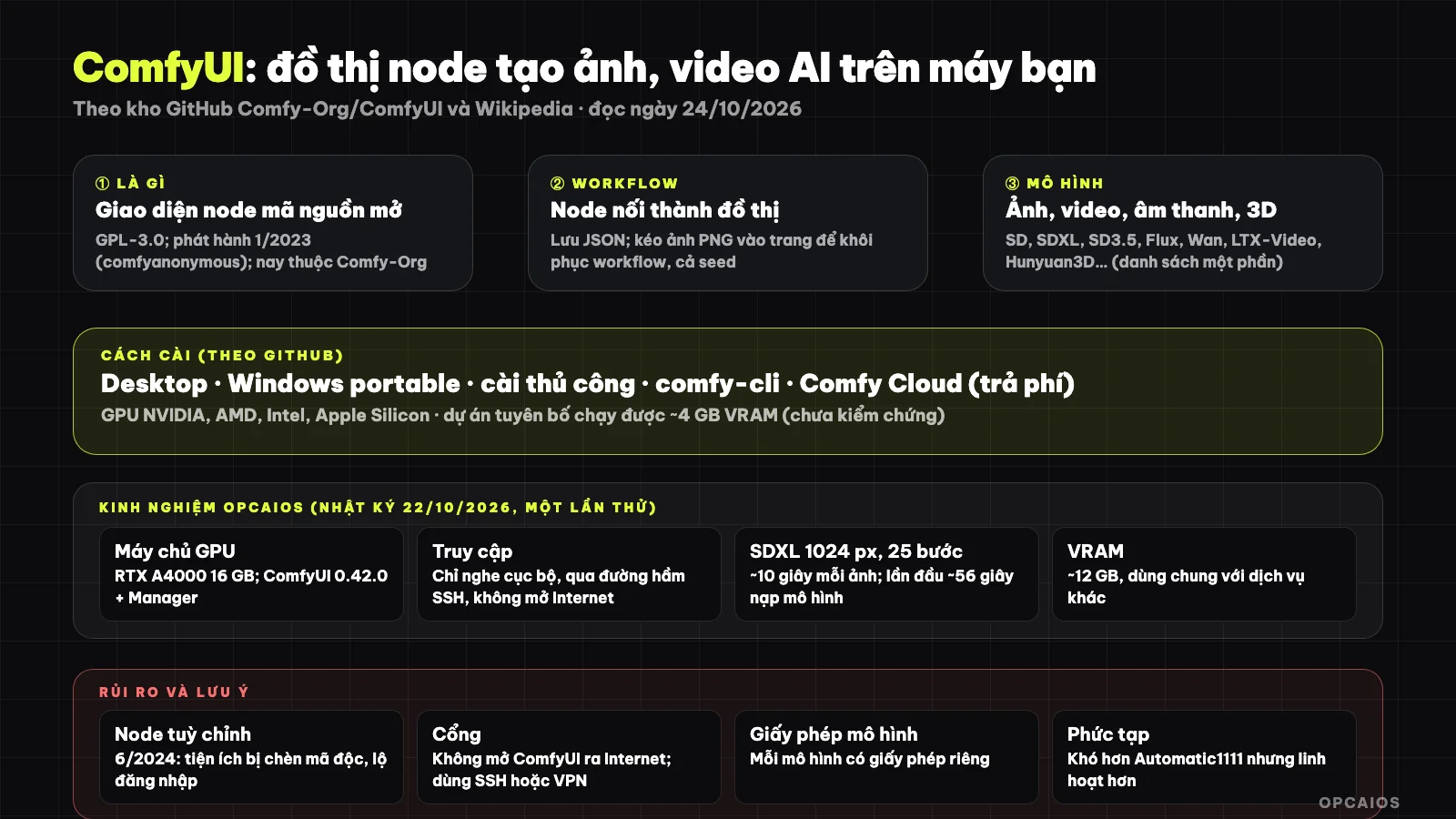
ComfyUI connects nodes into a workflow to create images and saves them to run again or share. Diagram: OPCAIOS.
What is ComfyUI and who created it?
ComfyUI is node-graph image creation software released by an anonymous author with the pseudonym comfyanonymous first on GitHub on January 16, 2023 according to Wikipedia's info box. Key milestones, according to Wikipedia (read 24/10/2026), include three steps: 1) the author previously worked with Stability AI, their collaboration ending before June 3, 2024 and afterwards Comfy Org was founded along with core developers; 2) August 2024 ComfyUI added Flux support and Comfy Org joined the Linux Foundation's Open Model Initiative; 3) currently the repository sits under the Comfy-Org organization, with around 142.3 thousand stars at the time of reading.
Wikipedia recorded 122 thousand stars in July 2026, so the star count is growing fast. Wikipedia describes ComfyUI as more complex than Automatic1111 but more flexible. For example, users familiar with form interfaces will find the node graph harder at first, but in return can save and share the entire process as JSON or a PNG image. The star counts and time milestones we have not verified against other sources.
How does ComfyUI work?
ComfyUI works by connecting nodes into a workflow, each node doing one job like loading a model, encoding text prompts with CLIP, sampling, or decoding images. According to the GitHub repository (read 24/10/2026), ComfyUI has five key points.
- Visual node graph to build and reuse workflows for images, video, audio, 3D and text; has subgraph, workflow templates, App Mode and local API.
- Asynchronous queue and partial graph re-run: only re-run the changed part.
- VRAM and RAM management, pushing models to memory, supporting quantized models.
- JSON-format workflows, and drag created PNG images onto the page to restore the entire workflow, including random seed.
- Offline running:
--offlineflag disables paid API nodes;--disable-partner-nodesonly disables partner nodes.
The supported models listed (partial list): images (SD 1.5, SDXL, SD3.5, Flux.1, Flux.2, Qwen Image), video (Wan 2.1 and 2.2, LTX-Video, HunyuanVideo, CogVideoX, Mochi), audio (ACE-Step, Stable Audio), 3D and vision (Hunyuan3D, SAM 3, BiRefNet) and text (Gemma, Qwen3). To understand the foundation of language models included, see What is LLM?.
What are the ways to install ComfyUI?
ComfyUI has five installation methods, according to the GitHub repository (read on 24/10/2026).
- Method 1) Desktop application for Windows and macOS, recommended for beginners.
- Method 2) Windows portable version, standalone, unzip and run, supports NVIDIA, AMD, Intel GPU or CPU only.
- Method 3) Manual installation for all supported operating systems using
git clonethenpip install -r requirements.txt. - Method 4) comfy-cli, install via
pipfor those comfortable with the command line. - Method 5) Comfy Cloud, paid hosted version for those without a GPU.
For manual installation on NVIDIA cards series 20 and above, the repository requires PyTorch cu130 and higher, Python, PyTorch with the correct CUDA or ROCm version, and model files (checkpoint) placed in the models folder. For example, beginners on Windows should start with Desktop instead of manual installation. Read the README first since version requirements change. If you need a server with GPU, see What is VPS?.
Table of installation methods
According to the GitHub repository:
| Method | For | Notes |
|---|---|---|
| Desktop application | Windows and macOS | Recommended for beginners |
| Windows portable | NVIDIA, AMD, Intel GPU or CPU only | Standalone, unzip and run |
| Manual installation | All supported operating systems | git clone then pip install -r requirements.txt |
| comfy-cli | Command line | Install via pip |
| Comfy Cloud | No GPU | Paid hosted version |
For manual installation on NVIDIA cards series 20 and above, the repository requires PyTorch cu130 and higher. Manual installation requires Python, PyTorch with the correct CUDA or ROCm version, and model files (checkpoint) placed in the models folder; read the README first since version requirements change. If you need a server with GPU, see What is VPS? about renting and managing servers.
What hardware does ComfyUI need?
ComfyUI needs a supported GPU, and according to the GitHub repository (read on 24/10/2026) the project lists GPUs from NVIDIA, AMD (ROCm on Linux and Windows), Intel (torch.xpu) and Apple Silicon, plus some NPUs. The repository claims the largest open models run with around 4 GB VRAM and 8 GB RAM thanks to memory management and model offloading. This is the project's claim; running doesn't mean fast, and OPCAIOS hasn't verified the 4 GB number. In reality, speed depends on three factors: model, resolution and number of steps, plus VRAM size. For example, in OPCAIOS's testing on an RTX A4000 16 GB card, a 1024 px SDXL image at 25 steps took around 10 seconds, and VRAM usage was around 12 GB; the result only applies to that one model and card. For those without a GPU, Comfy Cloud or hourly GPU services are alternatives, but OPCAIOS hasn't read the prices.
What security risks do ComfyUI custom nodes and models have?
Custom nodes are ComfyUI's extension system, both a great power and an attack surface. One incident, according to Wikipedia (read on 24/10/2026): in June 2024 a hacker group "Nullbulge" took over the ComfyUI_LLMVISION extension, injected malware and exposed login credentials for hundreds of users; vpnMentor reported the extension could steal crypto wallets, take screenshots and access files. The general rules have five steps:
- Step 1: only install nodes from sources you trust, read the code or community reviews first; limit the number of nodes.
- Step 2: run on a separate machine or account, don't share a browser logged into important accounts and crypto wallets.
- Step 3: don't expose ComfyUI to the Internet; by default it listens locally, access remotely via SSH or authenticated VPN.
- Step 4: download models from trusted sources, prefer safe formats (safetensors).
- Step 5: back up workflows and record which node versions you use.
For example, someone who installed ComfyUI_LLMVISION in 2024 on a machine with a crypto wallet may have had their wallet exposed, so Step 2 is most important.
When should you choose ComfyUI?
| Need | Suggestion |
|---|---|
| Control each step, repeatable workflows, automation via API | ComfyUI |
| Create images quickly with a simple interface | Simpler direct tools or hosted service |
| No GPU, need to try quickly | Comfy Cloud or hourly GPU service |
| Sensitive data can't leave the machine | Run locally, offline mode |
| Advertising images need clear license | Read each model's license before commercial use |
About licenses: ComfyUI is GPL-3.0, but each model you download has its own license; read it before using for commercial purposes.
How OPCAIOS Installed and Tested ComfyUI
According to the operation log from 22/10/2026, I installed ComfyUI (version 0.42.0) on a GPU server with an RTX A4000 16 GB card, following three steps.
- Step 1: Install ComfyUI along with the ComfyUI-Manager node manager and the SDXL base 1.0 model.
- Step 2: Run it as a background process, listening only to the local address, accessed via SSH, not exposed to the Internet.
- Step 3: Call the SDXL image creation API at 1024 px, 25 steps.
In practice, I tested and measured around 10 seconds per image, about 56 seconds the first time because the model had to load, and VRAM usage was around 12 GB, shared with another service on the same card. When checking again on 24/10/2026, the service was not responding, so I cannot confirm the service was running at the time of writing this article. This is only a single test with one model and one card, not an official performance evaluation; I have not yet run video workflows or Flux.
Read more: 5 best open-source AI video creation tools 2026, 5 best AI image upscaling tools 2026, 5 best local AI running tools 2026.
Frequently Asked Questions
What is ComfyUI?
It is open-source software with a node interface to create images, videos, audio, and 3D using diffusion models, running on your machine.
Is ComfyUI free?
The software is open source, GPL-3.0 license, runs free on your machine. Comfy Cloud is the paid hosted version; I have not read its pricing yet.
What configuration does ComfyUI need?
According to the GitHub repository, it supports NVIDIA, AMD, Intel, and Apple Silicon GPUs; the project claims large models can run with around 4 GB VRAM thanks to memory management, but larger VRAM gives better speed and resolution.
How is ComfyUI different from Automatic1111?
ComfyUI uses node graphs, flexible and reusable workflows but more complex; Automatic1111 has a more familiar form interface according to the general description on Wikipedia.
Is it safe to install custom nodes?
Not all nodes are safe; there was malicious code injection in an extension in 2024. Only install from trusted sources and run in an isolated environment. If you want to learn how to safely use AI image generation in your business, check out OPCAIOS's AI application training course.
Source: Comfy-Org/ComfyUI GitHub repository and Wikipedia "ComfyUI", read directly on 24/10/2026; the docs.comfy.org page returned a 404 error so I did not read it; star count changes quickly. The 4 GB VRAM claim is from the project, not yet verified. Performance measurements are from one test by me according to the 22/10/2026 operation log. Experience is mine.
Translated from Vietnamese with AI. Read the original.
Want to apply this in your business?
Book a free 30-minute call (Vietnam time, in English or Vietnamese).