

Gemini API là gì và nên bắt đầu từ đâu?
Gemini API là giao diện lập trình để phần mềm của bạn gửi yêu cầu tới các model Gemini của Google, còn Google AI Studio là trang web để thử prompt, tạo khoá API, xem hạn mức và bật thanh toán cho chính Gemini API đó. Phần giới thiệu chung về Gemini nằm ở bài Gemini là gì?. Bài không hứa gói miễn phí đủ cho sản phẩm thật, không bảo đảm giá giữ nguyên, không phải tư vấn pháp lý; mọi con số đọc trên trang chính thức ngày 04/11/2026, tính bằng USD, chưa gồm thuế, có thể khác khi thanh toán từ Việt Nam. Bài đi qua lấy khoá, gói, rate limit, giá, dữ liệu, endpoint tương thích OpenAI và rủi ro lộ khoá.
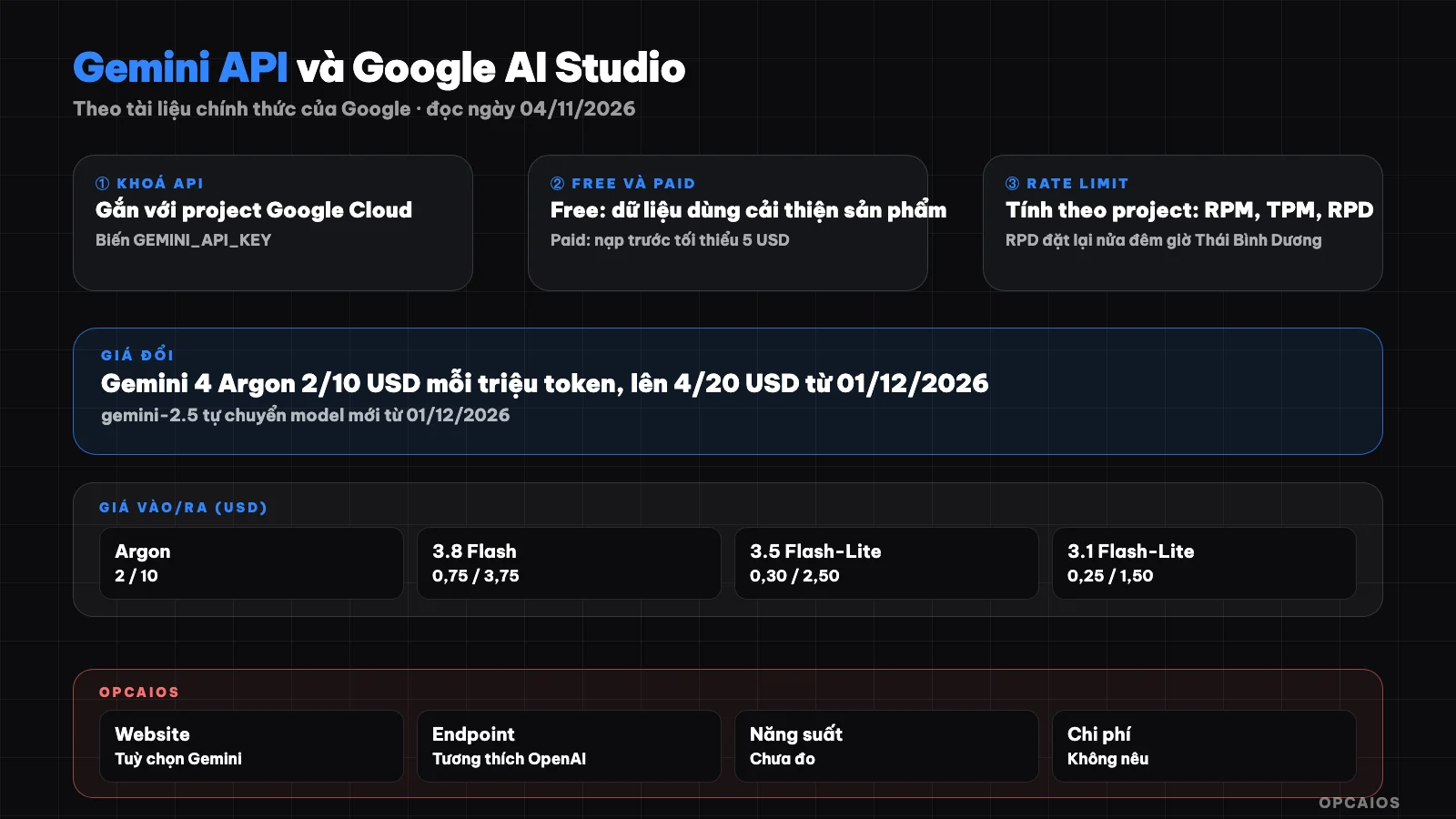
Từ AI Studio tới cuộc gọi API đầu tiên: khoá, gói, hạn mức và an toàn. Sơ đồ: OPCAIOS.
Google AI Studio và Gemini API khác nhau thế nào?
Google AI Studio là bảng điều khiển trên web, còn Gemini API là cổng để mã nguồn gọi model. Theo tài liệu Gemini API trên ai.google.dev (đọc ngày 04/11/2026), mỗi khoá Gemini API gắn với một project Google Cloud, nơi quản lý thanh toán, người cộng tác và quyền; người dùng mới chấp nhận điều khoản trong AI Studio sẽ được tạo sẵn một project mặc định và một khoá API. Ứng dụng hay công cụ như n8n gọi Gemini API qua HTTP. Điều khoản bổ sung của Gemini API (hiệu lực từ 23/03/2026) ghi AI Studio và Gemini API dành cho nhà phát triển dùng vì mục đích công việc, không dành cho người tiêu dùng, và người dùng phải từ 18 tuổi. Nếu khái niệm API còn mới, xem API là gì.
Lấy khoá Gemini API như thế nào?
Lấy khoá Gemini API làm trong AI Studio; danh sách vùng khả dụng đọc ngày 04/11/2026 có Việt Nam. Các bước theo tài liệu:
- Đăng nhập Google AI Studio bằng tài khoản Google, chấp nhận điều khoản.
- Mở trang API keys; người mới đã có sẵn project mặc định và một khoá.
- Tạo project riêng cho từng ứng dụng nếu muốn tách chi phí.
- Đặt khoá vào biến môi trường
GEMINI_API_KEY(hoặcGOOGLE_API_KEY, biến này được ưu tiên nếu đặt cả hai), không dán vào mã.
Tài liệu cũng ghi từ ngày 28/05/2026, khoá mới tạo trong AI Studio mặc định là "authorization key": gắn với một service account, giới hạn sẵn cho Gemini API, có cơ chế chặn nhanh khoá bị lộ. Gemini API từ chối khoá "standard" không có giới hạn; khoá standard đã được giới hạn vẫn chạy.
Gói miễn phí và gói trả phí của Gemini API khác gì nhau?
Gói Free và gói Paid của Gemini API khác nhau ở model, hạn mức, tính năng và cách Google dùng dữ liệu. Theo trang Pricing (đọc 04/11/2026):
| Tiêu chí | Free | Paid |
|---|---|---|
| Model | Một số model | Có các model mạnh nhất |
| Token | Miễn phí | Trả theo triệu token |
| Tính năng | AI Studio | Context caching, Batch API giảm 50% |
| Dữ liệu | Được dùng cải thiện sản phẩm | Không dùng cải thiện sản phẩm |
Theo trang Billing, lên Paid cần liên kết tài khoản thanh toán và nạp trước tối thiểu 5 USD vào số dư Prepay; khi số dư về 0, các khoá trong project bị từ chối cho tới khi nạp thêm. So sánh gói cho người dùng ứng dụng Gemini nằm ở bài Gemini miễn phí và trả phí.
Rate limit của Gemini API tính ra sao?
Rate limit của Gemini API là số yêu cầu và số token được gửi trong một khoảng thời gian, tính theo project chứ không theo khoá. Theo trang Rate limits (đọc 04/11/2026), có ba thước đo chính: yêu cầu mỗi phút (RPM), token đầu vào mỗi phút (TPM) và yêu cầu mỗi ngày (RPD); vượt mức nào cũng bị lỗi, RPD đặt lại lúc nửa đêm giờ Thái Bình Dương. Trang này không đăng bảng số cố định cho từng model mà hướng người dùng xem hạn mức đang áp dụng trong AI Studio, kèm lưu ý hạn mức không được bảo đảm. Bảng tier đọc được:
| Tier | Điều kiện | Trần chi tiêu tier | Trần mỗi 10 phút |
|---|---|---|---|
| Free | Project đang hoạt động | Không áp dụng | Không áp dụng |
| Tier 1 | Liên kết tài khoản thanh toán | 250 USD | 10 USD |
| Tier 2 | Đã trả 100 USD, qua 3 ngày | 2.000 USD | 200 USD |
| Tier 3 | Đã trả 1.000 USD, qua 30 ngày | 20.000 đến hơn 100.000 USD | 200 USD |
Nên tự đặt giới hạn chi tiêu hằng tháng cho project trong AI Studio ngay khi bật thanh toán.
What is the price of Gemini API by model today?
Gemini API pricing is calculated per million tokens, differs by model, and several models have announced price increases. The table below shows the Standard pricing for some text models from the Pricing page on 04/11/2026; Google notes that price changes typically take effect 30 days after posting.
| Model | Free | Input (USD/1 million token) | Output (includes thinking token) |
|---|---|---|---|
| Gemini 4 Argon | No | 2.00; from 01/12/2026 is 4.00 | 10.00; from 01/12/2026 is 20.00 |
| Gemini 3.8 Flash | Yes | 0.75; from 01/01/2027 is 1.50 | 3.75; from 01/01/2027 is 7.50 |
| Gemini 3.1 Pro Preview | No | 2.00 (prompt up to 200k token) | 12.00 |
| Gemini 3.5 Flash-Lite | Yes | 0.30 | 2.50 |
| Gemini 3.1 Flash-Lite | Yes | 0.25 (text, image, video) | 1.50 |
Note: thinking tokens are counted toward output; Grounding with Google Search has 5,000 free requests per month shared across Gemini 3 and above models, after that 14 USD per 1,000 requests. The Pricing page also notes that Gemini 2.5 Flash and 2.5 Pro have been discontinued for selection in AI Studio; from 01/12/2026 requests to gemini-2.5-flash automatically switch to Gemini 3.5 Flash-Lite, requests to gemini-2.5-pro automatically switch to Gemini 3.8 Flash and are charged at the new model's price.
Is free tier data used to improve the product?
Yes. The supplemental terms of Gemini API (read on 04/11/2026) classify free AI Studio and the free quota portion of Gemini API as "Unpaid Services". For this group, Google uses submitted content and responses to provide, improve, develop products and machine learning technology; reviewers may read input and output after data is separated from the account and project. The terms advise against sending sensitive, confidential or personal information to unpaid services. For "Paid Services" (projects with an active billing account), Google does not use prompts and responses to improve products, only keeping time-limited logs to detect policy violations. AI Studio is considered a paid service even when it costs nothing, if the account has access to a project linked to an active billing account. This is a summary, not legal advice. See also 5 data security rules for business when using AI.
What command do I use to call Gemini API for the first time?
The minimum call according to the Quickstart page (read 04/11/2026) is a POST request to the interactions endpoint, passing the key through the header. The section below is copied from the documentation, requires the GEMINI_API_KEY variable to have a key:
curl -X POST "https://generativelanguage.googleapis.com/v1beta/interactions" \
  -H "x-goog-api-key: $GEMINI_API_KEY" \
  -H 'Content-Type: application/json' \
  -H "Api-Revision: 2026-05-20" \
  -d '{
    "model": "gemini-3.8-flash",
    "input": "Explain how AI works in a few words"
  }'
We did not run this command when writing the post; the model name and Api-Revision value may change, get the latest version from the Quickstart page.
How do I use Gemini API's OpenAI-compatible endpoint?
The OpenAI-compatible endpoint allows code already using the OpenAI library to call Gemini models by changing three things: API key, base URL and model name. According to the OpenAI compatibility page (read 04/11/2026), the base URL is https://generativelanguage.googleapis.com/v1beta/openai/, the key is passed through the Authorization: Bearer header, the chat path is chat/completions, and the documentation has examples for Python, JavaScript and REST with the gemini-3.8-flash model. Google recommends that if you haven't used the OpenAI library yet, call Gemini API directly.
What are the risks if Gemini API key is exposed and how do I handle it?
Exposed Gemini API key means others can consume the project's quota, incur bills and access private resources; Google's documentation advises treating the key like a password. The rules on the API keys page (read 04/11/2026):
- Do not put the key in Git.
- Do not embed the key in web or mobile applications on the user side; call the API through an intermediary server.
- Read the key from environment variables; production environments use secret storage like Google Cloud Secret Manager.
- Enable billing alerts and set spending limits for the project.
- Restrict the key to Gemini API only, and by IP or application if possible.
When suspecting key exposure: create a new key, redeploy the application with the new key, disable the old key when the new key runs smoothly, then check billing logs and usage. See also security when using AI to write code.
OPCAIOS Experience
The admin panel at opcaios.org has a "Google Gemini" provider option for AI writing features, going through the OpenAI-compatible endpoint described above; it's an available option, but we're not claiming we use it daily. During a test run on 03/11/2026, an internal short video builder used a Gemini Flash Image model to generate illustration images; the results had errors (repeated images, one image with wrong characters), so we haven't used it in production yet. We haven't measured the cost or long-term stability of the Gemini API. The only lesson I can confidently state: separate keys by application, keep keys on the server, never in browser-side code.
Frequently Asked Questions
Is Gemini API free?
There's a Free plan with free tokens for some models, according to the Pricing page read on 04/11/2026. Gemini 3.8 Flash and Gemini 3.5 Flash-Lite have a Free column marked as free, while Gemini 4 Argon and Gemini 3.1 Pro Preview are not available in the Free plan. The Free plan has quota limits and input data may be used to improve Google's products, so it's only suitable for testing with non-sensitive data.
Is rate limit counted per API key or per project?
According to the Rate limits page read on 04/11/2026, rate limits apply per project, not per API key, so creating additional keys within the same project won't increase your quota. To separate quotas, create a separate project for each application. Your specific limits can be found in the Rate limit page within Google AI Studio, since Google doesn't publish fixed numbers and explicitly states that limits are not guaranteed.
How much does the Gemini API paid plan cost to start?
According to the Billing page read on 04/11/2026, to upgrade to a paid plan you need to link a billing account and prepay a minimum of 5 USD (or equivalent) into your Prepay balance, then pay based on actual token usage depending on the model. Tier 1 has a spending cap of 250 USD; to upgrade to Tier 2 you need to have already paid 100 USD and waited 3 days. The actual amount paid from Vietnam may differ due to taxes and exchange rates; we haven't verified this.
Can I use the OpenAI library to call Gemini?
Yes. The OpenAI compatibility page read on 04/11/2026 shows that the OpenAI library for Python, JavaScript, and REST can call Gemini models when you switch the key to a Gemini key, change the base URL to Google's v1beta/openai/ endpoint, and change the model name, for example gemini-3.8-flash. Google still recommends calling the Gemini API directly if you're not yet using the OpenAI library, since some exclusive features are only available in the native API.
If I want to bring Gemini API into my business workflow, where do I start?
Pick a small, repetitive task with non-sensitive data, like summarizing articles or classifying emails. Test it on AI Studio first, then call the API through an automation tool, set spending limits and measure results for a few weeks before scaling up. See also AI system that runs on its own. If you want guided coaching with a roadmap, check out OPCAIOS's AI application training course.
Source: Gemini API documentation (address ai.google.dev now redirects to aistudio.google.com/docs) including (Pricing, Rate limits, API keys, Billing, Quickstart, OpenAI compatibility, Available regions) and Gemini API Additional Terms of Service effective 23/03/2026 (read on 04/11/2026); items not verified: responses from sample commands (not executed), specific Free limits per model (only shown in AI Studio), actual amount paid from Vietnam; prices and model names may change after the read date. The experience is from OPCAIOS.
Translated from Vietnamese with AI. Read the original.
Want to apply this in your business?
Book a free 30-minute call (Vietnam time, in English or Vietnamese).