

What is Gemini?
Gemini is what? Gemini is the umbrella name Google gives to an entire ecosystem of AI products: a chat application on web, phone, and desktop; a family of language models developed by Google DeepMind; an API suite for developers; and an AI layer embedded in Gmail, Docs, Sheets within Google Workspace. Because one word "Gemini" refers to many things, newcomers easily get confused: paying for Google AI Pro doesn't mean you get free API access. This post doesn't score Gemini higher or lower than ChatGPT, Claude, and doesn't promise any features available in Vietnam for all accounts. Model names, packages, and features change rapidly; all names and numbers in this post come from official pages as of 04/11/2026. The post maps out each layer with links to deeper dives, then wraps up with a table of "use this for that".
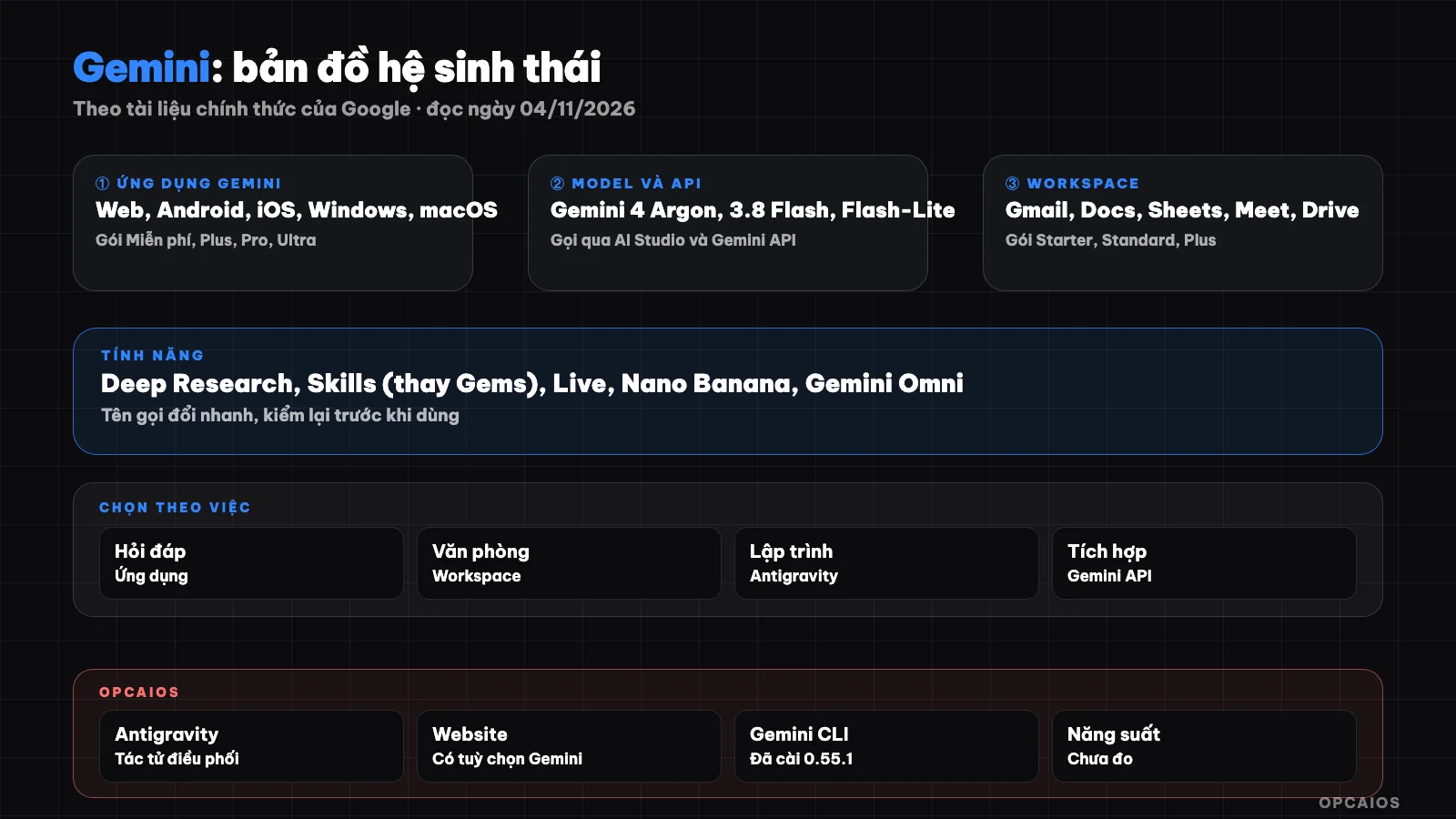
One name Gemini, four product layers: app, model, API, and Workspace. Diagram: OPCAIOS.
What is Gemini, and why does one name refer to so many things?
Gemini is a shared brand, and what you actually use is always one of four specific layers. Telling these four layers apart helps avoid most confusion when reading news, picking a plan, or asking for support:
- Gemini app: where ordinary users chat, at gemini.google.com, on Android and iOS apps, and according to official release notes, a macOS app from 15/04/2026 and Windows app from 10/09/2026.
- Gemini model: the "brain" underneath, for example Gemini 4 Argon or Gemini 3.8 Flash.
- Gemini API: the gateway for software to call the model, billed by token, managed at Google AI Studio.
- Gemini in Workspace: AI embedded in Gmail, Docs, Sheets, Meet for work accounts, bought as part of a Workspace plan.
Bard used to be the name of the chat app; Google renamed Bard to Gemini from February 2024, so older posts mentioning "Bard" are talking about the Gemini app as it was then.
What is the Gemini app on web and mobile for?
The Gemini app is Google's chat assistant for individual users, using a Google account, with free and paid plans: Google AI Plus, Pro, Ultra. According to the Help page "Gemini Apps limits & feature availability" (read 04/11/2026), the free plan still has Canvas, image creation with Nano Banana 2, Deep Research, music creation, slide creation, and audio overview; video creation, task scheduling, and Daily brief need a paid plan. Context window varies by plan: 32,000 tokens on the free plan, 128,000 on Plus, 1 million on Pro and Ultra. Rate limits refresh every 5 hours until you hit the weekly cap. The plan table, pricing, and feature differences are in the post How is free Gemini different from paid plans?.
What do the current Gemini model lines include?
The Gemini model family now splits by "weight class": Argon is the top reasoning model, Flash balances speed and price, Flash-Lite is cheapest and fastest. According to the Models page on Gemini API (read 04/11/2026), the main text models are:
- Gemini 4 Argon: leading reasoning model, 1 million token context, takes text, images, audio, video, and PDF. According to release notes, Argon reached Google AI Pro and Ultra users from 13/10/2026.
- Gemini 3.8 Flash: newest Flash version, aimed at longer coding and agents.
- Gemini 3.6 Flash and Gemini 3.5 Flash-Lite, 3.1 Flash-Lite: stable versions for daily work and high volume.
- Gemini 2.5 Flash, 2.5 Pro: no longer recommended; the page says they will move to new models from 01/12/2026.
There are also specialized models for voice (Live, TTS), transcription, embedding, and music (Lyria). If you're just starting, see What is an LLM? to understand language models first.
Gemini API and Google AI Studio – how are they different from the Gemini app?
Gemini API is a service for developers to call the Gemini model from their own software, billed by token, completely separate from the Gemini app subscription. Google AI Studio is a web interface to try prompts, create API keys, and track usage. According to the Gemini API Pricing page (read on 04/11/2026), the free tier lets you use certain models like Gemini 3.8 Flash and 3.5 Flash-Lite at no cost, but content you send is used to improve Google's products; the paid tier does not. Gemini 4 Argon is not available on the free tier; the price on the page is 2 USD per 1 million input tokens and 10 USD per 1 million output tokens through 30/11/2026, increasing to 4 USD and 20 USD from 01/12/2026. This is the listed price in USD, before tax. A Google AI Pro subscription does not include API quota. How to get your key, choose a model, and keep your key safe is in the post Gemini API and AI Studio; for the concept of API, see What is an API?.
Gemini in Google Workspace – for whom?
Gemini in Google Workspace is AI built into Gmail, Docs, Sheets, Slides, Meet, and Drive for your organization account, purchased as part of a Workspace plan instead of an individual Google AI plan. According to the Workspace pricing page (read on 04/11/2026, Vietnam region, price in USD per user per month, before tax), Starter plan is listed at 7 USD, Standard at 14 USD, Plus at 22 USD; the page currently has a promotional price for the first 20 users. Gemini in Docs, Sheets, Meet starts from Standard; Starter only has Gmail, Vids, and the Gemini app. The biggest difference is data: the Workspace Privacy Hub states that customer content is not read by reviewers and is not used to train models outside the organization without permission. Details for each app are in the post Gemini in Google Workspace.
Is Gemini CLI still usable?
Gemini CLI is a programming agent that runs in the terminal, open-source under the Apache 2.0 license, but its role has changed. The official README on GitHub (read on 04/11/2026) clearly states that from 18/06/2026, free personal use and Google AI Pro and Ultra plan rights have moved to Antigravity CLI; Gemini CLI is now for organizations with Gemini Code Assist Standard, Enterprise, Code Assist for GitHub licenses, or paid API keys. The README also notes this tool is not refined for the Gemini 4 line. Individual users wanting a programming agent to run Gemini should see What is Antigravity?. Details are in the post What is Gemini CLI?.
What are Gems, Deep Research, image and video creation, and Gemini Live?
These are features inside the Gemini app, each solving a different kind of task:
- Gems: a customized assistant with built-in instructions for a repeated task. Release notes from 30/09/2026 say Skills will soon replace Gems and Gems will be migrated automatically. See Gems in Gemini.
- Deep Research: a self-planning mode that reads many sources and writes a report. Available in all plans but uses more quota, and free users may not be able to use it during peak times. See Deep Research from Gemini.
- Image and video creation: images use the Nano Banana family; video is available on paid plans, release notes mention Gemini Omni from 19/05/2026. See Create images and videos with Gemini.
- Gemini Live: voice conversation, share camera or screen on mobile. See Gemini Live and voice mode.
Which Gemini product to use for what?
The table below is based on the official page read on 04/11/2026; packages and features may vary by country and account.
| Task | Use | Notes |
|---|---|---|
| Q&A, drafting, summarizing personal documents | Gemini app, free plan | 32k token context |
| Long documents, many files, heavy daily use | Google AI Pro | 1 million token context, has Gemini 4 Argon |
| Market research with sources | Deep Research | Still need to verify sources yourself |
| Repeating one type of task with the same instructions | Gems, moving to Skills | Write instructions once |
| Illustration images, image editing | Nano Banana | Check for text errors, characters |
| Short videos | Paid plan, Google Flow | Uses most quota |
| Integrating into web, chatbots, automated workflows | Gemini API via AI Studio | Charged per token, separate from personal plan |
| Email, company-wide documents | Gemini in Workspace | Private data terms |
| Personal coding agent | Antigravity | Gemini CLI now for business |
| Q&A on your own document collection | Gemini Notebook (new name for NotebookLM) | See What is NotebookLM? |
If you're torn between assistants, the post Gemini, ChatGPT or Claude compares them by needs.
OPCAIOS's experience
Gemini appears in a few specific places in the OPCAIOS system, checked 03 to 04/11/2026:
- Orchestration agent: the system uses Google Antigravity, running Gemini model, as an orchestration agent, in parallel with Claude Code and Codex. The Antigravity model list on our account on 03/11/2026 has Gemini 4 Argon and Gemini 3.8 Flash; this list is per-account and may differ for you.
- Gemini CLI: the main machine has Gemini CLI version 0.55.1, no extensions installed yet, no MCP server configured, no productivity measured.
- Provider option: the admin panel has a "Google Gemini" option for AI writing features, via Google's OpenAI-compatible endpoint.
- Image creation trial: an internal short video building tool, trial run on 03/11/2026, used a Gemini Flash Image model to generate illustration images; results had errors, with repeated images and one wrong character. We have not yet used Veo for real video.
We have not used Gems, Deep Research, Gemini Live or Gemini in Workspace to evaluate, and do not disclose our current paid plan.
Frequently Asked Questions
What is Gemini, is it just a chatbot?
Not just that. Gemini is the common name for four layers: a chat application, a family of AI models, Gemini API for developers, and an AI layer in Google Workspace. The chatbot that most users encounter is the Gemini application at gemini.google.com or on mobile. The other layers use the same models but have separate pricing, data terms, and purchasing methods, so when you read news about Gemini, check which layer the article is talking about.
Are Bard and Gemini the same thing?
Bard was the old name for Google's chat application. Starting February 2024, Google renamed Bard to Gemini, which overlaps with the name of the model family. Because of this, old guides that say "Bard" are usually no longer accurate about the interface, plan names, or features. When you encounter an old guide, compare it with the Gemini Help page before following it.
Does the Google AI Pro plan give me access to Gemini API?
No. The Google AI Pro plan applies to the Gemini application and some accompanying Google services like storage space, Google Flow, and Antigravity limits. Gemini API is charged separately by token through Google AI Studio, with a limited free tier and a paid tier. According to the Pricing page as of 11/04/2026, content sent through the free tier is used to improve products, while the paid tier is not.
Is Gemini free in Vietnam?
There is a free plan, you only need a Google account. The official plan page displaying for the Vietnam region as of 11/04/2026 shows the free plan at 0 đồng, Google AI Plus at 132,000 đồng per month, and Google AI Pro at 489,000 đồng per month; the page does not clearly state whether tax is included. The free plan is limited to a 32 thousand token context window and lower rate limits. For details, see the plan comparison article for free and paid tiers in this series.
Where should a beginner start learning Gemini?
Start with the Gemini application on the free plan, pick a task that repeats weekly like summarizing emails, and record what prompts work. Once you're comfortable, try Deep Research on a question that needs multiple sources and fact-check each source yourself. Only upgrade your plan when you truly hit the limits. If you want structured learning, check out AI Application Training course from OPCAIOS.
Sources: gemini.google/subscriptions and gemini.google/students (Vietnam region), gemini.google/release-notes, support.google.com/gemini (Gemini Apps limits & feature availability, Gemini Apps Privacy Hub, Gemini Live), Models and Pricing pages from Gemini API (ai.google.dev, redirects to aistudio.google.com/docs), README google-gemini/gemini-cli on GitHub, workspace.google.com/pricing, Privacy Hub of Gemini in Workspace (as of 11/04/2026). Not verified: which models the free plan can choose in the menu per account, which features are enabled in Vietnam in Vietnamese, when Gems fully transitions to Skills. Experience is from OPCAIOS.
Translated from Vietnamese with AI. Read the original.
Want to apply this in your business?
Book a free 30-minute call (Vietnam time, in English or Vietnamese).