

Airtable là gì?
Airtable là nền tảng cơ sở dữ liệu trực tuyến có giao diện giống bảng tính: tôi lưu dữ liệu trong các bảng, liên kết các bảng với nhau, xem cùng một dữ liệu theo nhiều dạng như bảng, lịch, kanban, rồi dựng biểu mẫu, giao diện và quy trình tự động ngay trên đó. Khác bảng tính thường ở chỗ mỗi cột có kiểu dữ liệu rõ ràng và các bảng liên kết được như một cơ sở dữ liệu thật. Theo trang giá chính thức của Airtable (kiểm tra ngày 23/10/2026), gói Free giá $0 và gói Team $20 mỗi người mỗi tháng khi trả theo năm. Với doanh nghiệp nhỏ, Airtable hợp để quản lý khách hàng, đơn hàng, tồn kho hay lịch nội dung mà không cần biết lập trình. Bài viết đi qua: (1) khái niệm cơ bản; (2) giá; (3) cách bắt đầu; (4) tự động hoá và kết nối AI; (5) so sánh với Notion và Google Sheets.
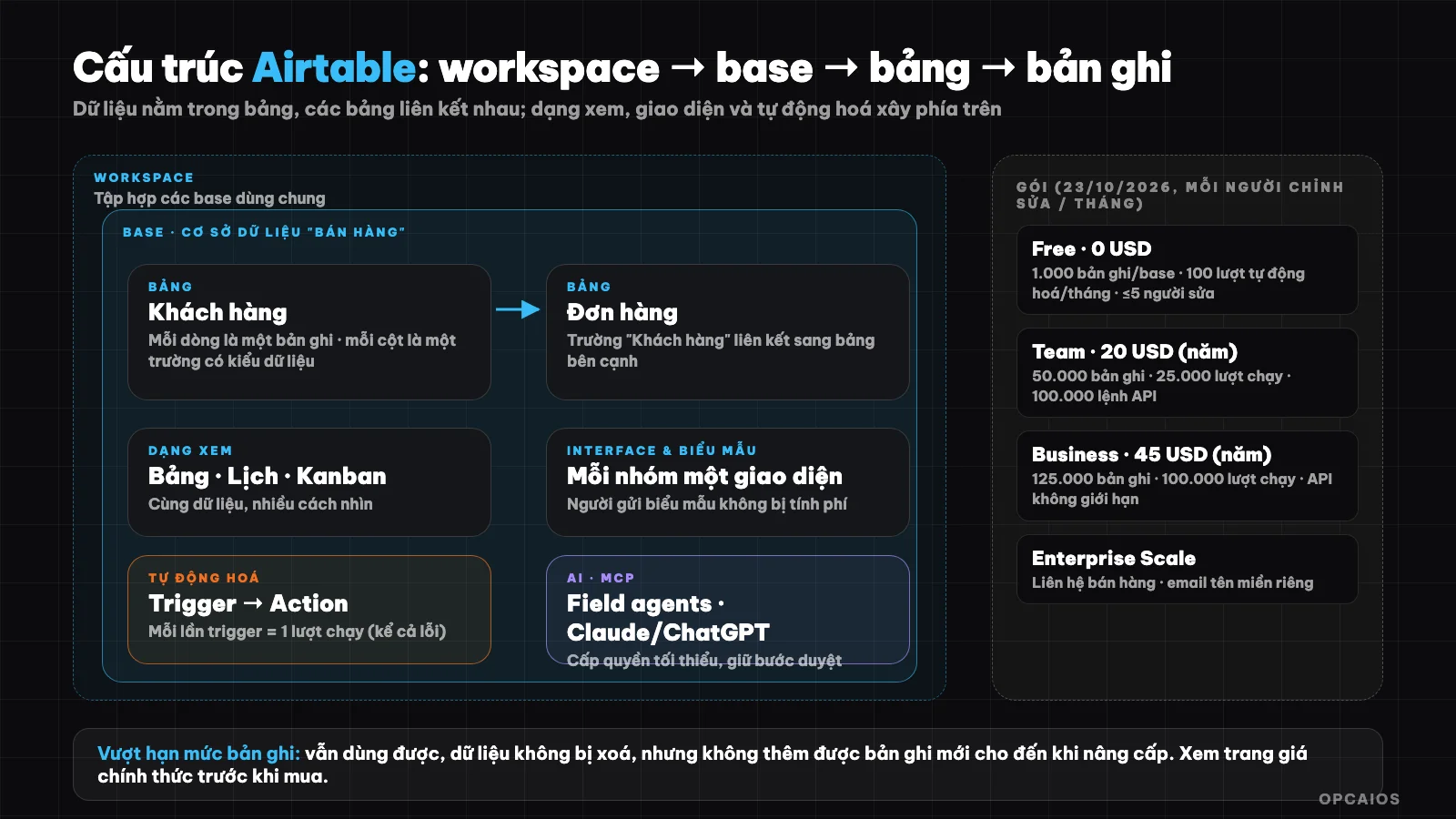
Các lớp của Airtable từ dữ liệu đến giao diện và tự động hoá. Sơ đồ: OPCAIOS.
Airtable là gì?
Airtable là nền tảng xây ứng dụng từ dữ liệu: tôi mô hình hoá công việc bằng cơ sở dữ liệu, rồi tạo giao diện, báo cáo và quy trình tự động trên đúng dữ liệu đó. Theo trang chủ chính thức của Airtable (kiểm tra ngày 23/10/2026), nền tảng được định vị là nền tảng xây ứng dụng thế hệ mới, kèm tác nhân AI, các tích hợp với Slack, Google Drive, Salesforce, Jira, Zendesk, và khả năng làm việc từ Claude hoặc ChatGPT qua MCP.
Cách hiểu đơn giản nhất: Airtable là bảng tính được nâng cấp thành cơ sở dữ liệu. Tôi vẫn thấy hàng và cột quen thuộc, nhưng mỗi cột có kiểu dữ liệu (văn bản, số, ngày, lựa chọn, tệp đính kèm, liên kết sang bảng khác), và mọi thay đổi cập nhật cho cả nhóm cùng lúc. Ví dụ giả định: một nhóm 5 người có thể cùng cập nhật danh sách khách mà không phải gửi file qua lại.
Base, bảng, bản ghi, trường và dạng xem là gì?
Năm khái niệm cơ bản của Airtable, theo thuật ngữ trong trung tâm trợ giúp chính thức, là workspace, base, bảng (table), bản ghi (record) và trường (field). Workspace là tập hợp các base dùng chung giữa nhiều người. Base là một cơ sở dữ liệu hoàn chỉnh gồm nhiều bảng. Bảng là một nhóm dữ liệu cùng loại, bản ghi là một dòng, còn trường là một cột. Dạng xem (view) là một cách nhìn và sắp xếp dữ liệu của một bảng, như dạng bảng (grid), lịch (calendar) hay kanban. Ví dụ, cùng một danh sách khách hàng, tôi xem dạng bảng để rà soát, dạng kanban để thấy khách ở bước nào của quy trình bán hàng. Sức mạnh thật của Airtable nằm ở liên kết giữa các bảng: một đơn hàng liên kết tới đúng một khách hàng, và ở bảng khách hàng tôi thấy ngay tất cả đơn của khách đó.
Bảng tóm tắt năm khái niệm
| Khái niệm | Ý nghĩa | Ví dụ |
|---|---|---|
| Workspace | Tập hợp các base dùng chung giữa nhiều người | "Công ty ABC" |
| Base | Một cơ sở dữ liệu hoàn chỉnh, gồm nhiều bảng | "Quản lý bán hàng" |
| Bảng (table) | Một nhóm dữ liệu cùng loại | "Khách hàng", "Đơn hàng" |
| Bản ghi (record) | Một dòng, đơn vị dữ liệu cơ bản | Một khách hàng cụ thể |
| Trường (field) | Một cột, một thuộc tính của bản ghi | Tên, số điện thoại, ngày liên hệ |
Does Airtable have a free plan and how much does it cost?
Airtable has a free plan and paid plans priced per editing user. According to Airtable's official pricing page and help center (checked on October 23, 2026), the Free plan costs $0 with 1,000 records per base and 100 automation runs per month. The Team plan costs $20 per person per month when billed annually ($24 when billed monthly), with 50,000 records per base. The Business plan costs $45 when billed annually ($54 when billed monthly), with 125,000 records per base. The Enterprise Scale plan requires contacting sales. The sensible order to choose a plan is first Free to try, then Team when you hit the limit, and finally Business when you need more records. New accounts get a 14-day free trial of the Team plan for their first workspace. Example: a CRM with 1,200 customers has already exceeded the 1,000 record limit of the Free plan, so you need the Team plan or to split your data across multiple bases. Pricing and limits change over time, so check the official pricing page before deciding.
Airtable plan limits in detail
| Plan | Cost per person per month | Records per base | Automation runs per month (per workspace) | Version history |
|---|---|---|---|---|
| Free | $0 | 1,000 | 100 runs | 2 weeks |
| Team | $20 when billed annually ($24 when billed monthly) | 50,000 | 25,000 runs | 1 year |
| Business | $45 when billed annually ($54 when billed monthly) | 125,000 | 100,000 runs | 1 year |
| Enterprise Scale | Contact sales | Per agreement | 500,000 runs | Per agreement |
A few things to know:
- Free plan limits to 1,000 records per base, 1,000 API calls per month for the entire workspace, 1 GB of attachments per base, maximum 5 editing users (read-only users are unlimited), and 500 AI points per person per month.
- Billed per editing user: Team and Business plans only charge for users with editing rights on at least one base; read-only users, form submitters, and users viewing shared links are not charged.
- Over limit: if you exceed record or attachment limits, you can still use your bases and data is not deleted, but you cannot add new records until you upgrade; with automation and API, the system stops at your plan's limit.
- Business and Enterprise Scale plans require a custom domain email, Gmail or Yahoo cannot be used.
How do I get started with Airtable in 30 minutes?
Getting started with Airtable means building a small base with two linked tables. This can be done in about 30 minutes in six steps, using a small sales management example, and Airtable's $0 Free plan (checked on October 23, 2026) is enough for the first 1,000 records with a maximum of 5 editing users:
- Step 1, create a base named "Sales" with two tables: "Customers" and "Orders".
- Step 2, choose the right data type for each field: name (text), phone number, customer source (single select), contact date (date), order value (currency).
- Step 3, link the two tables: add a "Customer" field of link type in the Orders table so each order is tied to one customer.
- Step 4, create views: a grid view to review, a kanban view by order status, a calendar view by delivery date.
- Step 5, create a form so customers or staff can enter data directly into the table.
- Step 6, add one simple automation, for example when a new customer record is created, send a notification to the person in charge.
Principle: one table per data type, link instead of duplicating entry, and choose the right field type from the start because changing types later is more work.
What are Interface and forms in Airtable?
Interface is a customized view built from base data using the Interface Designer tool, so each group only sees what they need. According to Airtable's help center (checked on October 23, 2026), an interface contains display components, data sources, and separate permissions, and all collaborators on a base can access that base's interfaces. Example: a sales employee sees a page with their customer list and a button to update status; a manager sees a dashboard with total sales summary, both reading the same data.
A form collects data from outside people without inviting them into the base, and form submitters are not charged. The Free plan has limits: you cannot change the form header image and cannot remove the Airtable branding. Example scenario: a small shop uses a form to receive consultation requests from customers, each submission creates a new record in the Customers table.
How Does Automation in Airtable Work?
Automation in Airtable is a pair of trigger and one or more actions that run automatically on your base's data. According to Airtable's official documentation (checked 23/10/2026), a trigger can occur within the base or in another integrated application; an action can update data in the base or affect other applications. For quota calculation, there are four things to remember:
- 1. Each time a trigger fires counts as one run, whether the action succeeds or fails. Failed runs also count toward your monthly quota.
- 2. The quota resets on the first day of each month. Free plan: 100 runs per month for the entire workspace; Team: 25,000; Business: 100,000.
- 3. Different limits on the number of automations per base (75 on Free, 100 on Team, 150 on Business) and this includes disabled automations; only deleting frees up space.
- 4. The Free plan has no Run a script action, and the send email action can only send to collaborators in the base.
If you need processes more complex than built-in automation, connect Airtable with external tools like n8n, Zapier, or Make. When a website sends a webhook, these tools can receive it and then create a new record in Airtable; see What is a Webhook?.
How Does Airtable Connect with AI and Other Systems?
Airtable has three main connection paths. First is built-in integration with popular applications like Slack, Google Drive, Salesforce, Jira, and Zendesk. Second is Web API for developers to read and write data, with call limits by plan: 1,000 calls per month on Free, 100,000 on Team, unlimited on Business; the article What is an API? explains the concept. Third is AI: according to Airtable's homepage (checked 23/10/2026), the platform has AI agents, AI-powered fields that automatically fetch, analyze, or generate data at the cell level, and MCP to work with Airtable data from Claude or ChatGPT; read What is MCP? if you're new to it.
When you let AI read and write real data, grant minimum permissions and keep a review step before irreversible actions. For example, give an agent only read access to 1 test base before opening write permissions on a real customer base. This principle applies to any other AI connection.
How Is Airtable Different from Notion and Google Sheets?
Airtable is strong in structured data and relationships; Notion is strong in documents and notes; Google Sheets is strong in calculation and familiarity. If your work leans toward documents and collaboration, see What is Notion?. If you only need calculations on a few hundred rows, Google Sheets is still enough and the cheapest. For example (hypothetically), a small CRM with customers, orders, and linked products suits Airtable, while an internal wiki suits Notion. The table below compares the three tools briefly across four criteria: focus, linking between tables, view types, and best use cases.
Comparison Table: Airtable, Notion, and Google Sheets
| Criteria | Airtable | Notion | Google Sheets |
|---|---|---|---|
| Focus | Relational database, spreadsheet-like interface | Documents, notes, lightweight database | Spreadsheet, formulas, charts |
| Linking Between Tables | Yes, the main strength | Yes, through linked databases | Limited, mainly through formulas |
| View Types | Table, calendar, kanban, custom interface | Table, list, calendar, chart | Mainly table |
| Best For | CRM, inventory, orders, workflow-driven content management | Wiki, notes, project management with documents | Calculation, quick reports, small data |
When Should and Shouldn't You Use Airtable?
Use Airtable when your data has many related types (customers, orders, products), many people update it together, and you want forms, interfaces, and automation on one platform without coding.
Don't use it when data is very large compared to your plan's limit (especially Free plan's 1,000 records per base), when you only need a single-person spreadsheet, or when costs per editing user grow fast because many staff need edit permissions. Also consider sensitive data: Airtable stores it on the provider's cloud, so check security policies and permissions before committing.
Read more: 5 Best Second Brain Tools 2026.
Frequently Asked Questions
What is Airtable and what is it used for?
Airtable is an online database platform that looks like a spreadsheet, used to manage customers, orders, inventory, content calendars, and build forms, interfaces, and automation on the same data without needing to code.
Is Airtable free?
Yes. According to Airtable's official pricing page (checked 23/10/2026), the Free plan costs $0 but is limited to 1,000 records per base, 100 automation runs per month, 1 GB of attachments per base, and a maximum of 5 editors. The Team plan costs around $20 per person per month when billed annually ($24 when billed monthly), with 50,000 records per base. The Business plan costs around $45 per person per month when billed annually. Example: a CRM with 1,200 customers already exceeds the 1,000 record limit of the Free plan, so you would need the Team plan or split data across multiple bases. New accounts get a free 14-day trial of the Team plan for the first workspace. So first, count your expected number of records, then count how many people need editing rights, and finally compare with the pricing table. Check the official pricing page for current numbers.
How is Airtable different from Google Sheets?
Each field in Airtable has a clear data type, and tables link to each other like a database, with the same data viewable as a table, calendar, kanban, or through a custom interface. Google Sheets is stronger in formulas and calculations.
How does Airtable charge for automation?
Airtable charges for automation by runs: each time a trigger is activated counts as one run, even if the action fails. According to Airtable's official pricing page and help center (checked 23/10/2026), the monthly limits vary by plan: 100 runs on Free, 25,000 on Team, and 100,000 on Business, counting for the entire workspace and resetting on the first day of the month. Example: a process that sends a notification each time a new customer arrives and receives 150 customers per month would exceed the 100-run limit of the Free plan. The number of automations in a single base is also limited: 75 on Free, 100 on Team, and 150 on Business, counting both active and inactive automations. The Free plan does not have the Run a script action. So first, count your expected runs per month, then compare with your plan's limit, and only then decide whether to upgrade.
Where can I learn Airtable quickly?
Start with a small base like the sales example above, and read Airtable's official help center. If you want to build a data system and AI workflows for a small business, check out OPCAIOS's AI application training course.
Source: the official homepage, pricing page, and help center of Airtable (plans, limits, automation, terminology; checked 23/10/2026). Pricing and limits are subject to change.
Translated from Vietnamese with AI. Read the original.
Want to apply this in your business?
Book a free 30-minute call (Vietnam time, in English or Vietnamese).