

Gemini CLI is what? Gemini CLI is Google's open-source AI agent (Apache 2.0 license) running in the terminal: you type requests in plain language, the agent reads code, edits files, runs shell commands and calls external tools via MCP, using the Gemini model. The general introduction to Gemini is in the post What is Gemini?. The most important thing to know beforehand: according to the README on GitHub and Google Developers blog (read 04/11/2026), from 18/06/2026 Gemini CLI stopped serving free users and Google AI Pro, Ultra users; this group was moved to Antigravity CLI. Gemini CLI is now for organizations with Gemini Code Assist Standard, Enterprise licenses and paid API key users. This post doesn't promise productivity gains (OPCAIOS hasn't measured it), only describes features per documentation, limits and who should still use it.
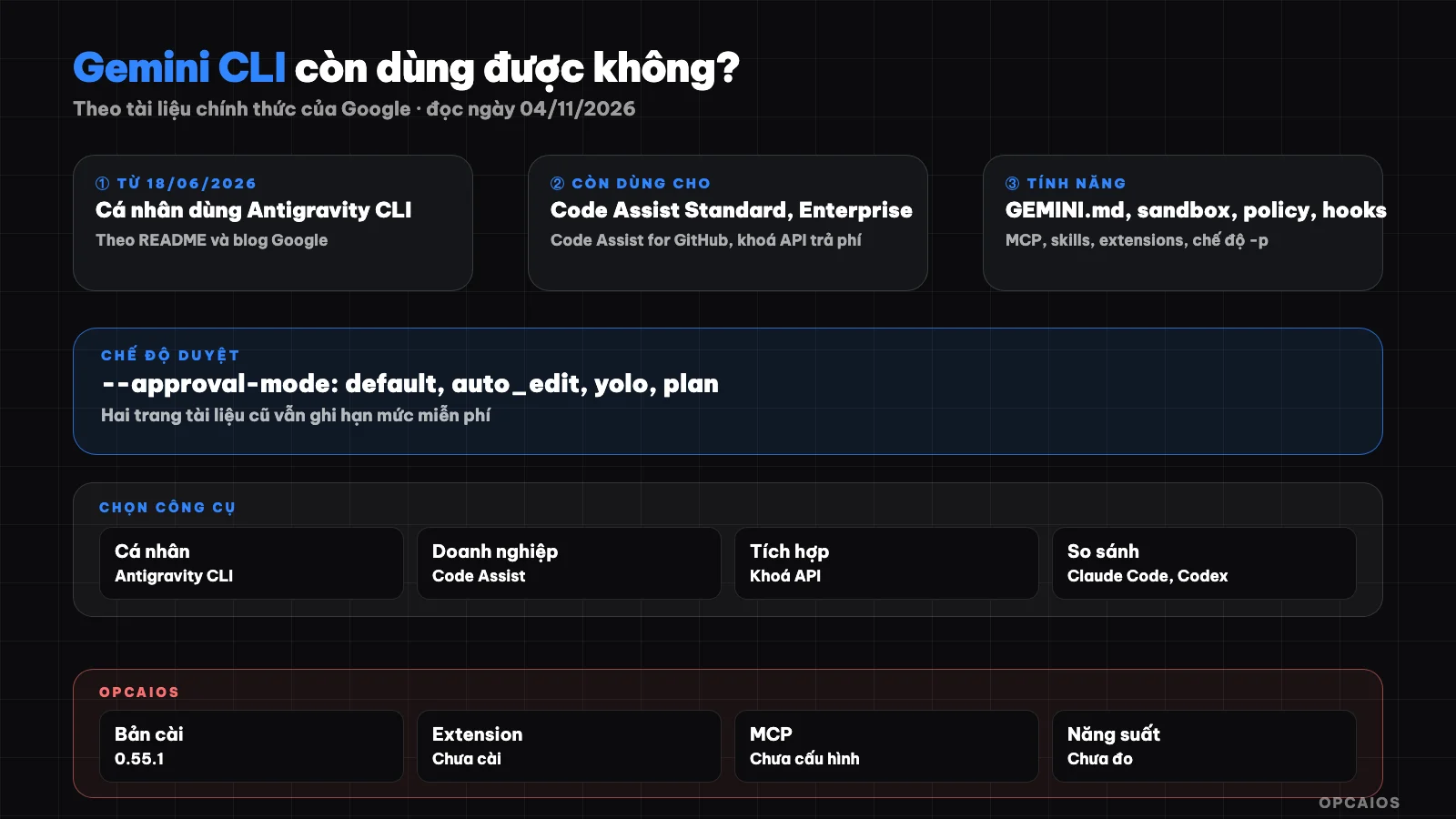
Gemini CLI: from setup to control layers and extensions. Diagram: OPCAIOS.
Who is Gemini CLI for now after the June 2026 change?
Gemini CLI is now mainly for organizations on Google Cloud, no longer the default choice for individuals. The post "An important update: Transitioning Gemini CLI to Antigravity CLI" on Google Developers Blog (19/05/2026, read 04/11/2026) states that from 18/06/2026, Gemini CLI stopped serving requests from Google AI Pro, Ultra users and free users via Gemini Code Assist for individuals. Business users with Gemini Code Assist Standard or Enterprise licenses retain access, and Gemini CLI still works with paid API keys. The README (read same date) adds: Gemini CLI is not yet optimized for the Gemini 4 line like Gemini 4 Argon, and shouldn't be used to score models. Google suggests individuals use Antigravity CLI (command agy); calling API from scripts has its own tool which is Gemini API CLI. If you're a solo worker, read Antigravity CLI (agy) before installing Gemini CLI.
How to install Gemini CLI?
Installing Gemini CLI requires Node.js 20 or later; the Installation page (read 04/11/2026) lists macOS 15 or later and Windows 11 24H2 or later in system requirements. Installation methods per README:
npx @google/gemini-cli
npm install -g @google/gemini-cli
brew install gemini-cli
The first line runs a trial without installing, the second installs globally via npm, the third installs via Homebrew on macOS or Linux. The project has three release channels: nightly, preview and stable (weekly). The latest stable on the changelog page as of 04/11/2026 is v0.64.0, released 13/10/2026. Check your current version with gemini --version.
What are the ways to log into Gemini CLI?
Logging into Gemini CLI has three ways per README and Authentication page (read 04/11/2026):
- Sign in with Google: run
gemini, choose to sign in, browser opens login page, information is saved locally for next time. With organization Code Assist license, need to setGOOGLE_CLOUD_PROJECTvariable. - Gemini API key: get key in Google AI Studio, set in
GEMINI_API_KEYvariable. - Vertex AI: set
GOOGLE_API_KEYandGOOGLE_GENAI_USE_VERTEXAI=true.
Note: Authentication page still recommends signing in with personal Google account, which conflicts with README and blog; we consider README and blog more recent. How to get and protect keys is in Gemini API and AI Studio.
What is GEMINI.md in Gemini CLI used for?
GEMINI.md is a context file containing long-term instructions for the agent, like code conventions, test commands, writing style, so you don't repeat them in each prompt. Per the "Provide context with GEMINI.md files" page (read 04/11/2026), Gemini CLI loads context in three layers then merges content with each prompt:
- Global file in the
.geminidirectory in the user's home, applies to all projects. - File in the working directory and parent directories, applies to the current project.
- File loaded on demand: when a tool touches a directory, CLI finds GEMINI.md there and parent directories up to trusted root.
The /memory show command displays loaded context; split large files using @file.md syntax. The idea is like CLAUDE.md from Claude Code and AGENTS.md from Codex.
How Are the --approval-mode Approval Modes Different?
The approval mode decides what the agent can do on its own without asking you. According to gemini --help version 0.55.1, the --approval-mode flag accepts four values:
| Mode | Behavior from help | When to use |
|---|---|---|
default |
Ask before running tools | Real projects, when starting out |
auto_edit |
Auto-approve file-editing tools | Familiar code edits, with Git |
yolo |
Auto-approve all tools | Only in sandbox or test machines |
plan |
Read-only | Surveys, planning before editing |
The -y or --yolo flag is equivalent to yolo mode. The Plan Mode page (read 04/11/2026) describes plan as a read-only environment for researching and planning before editing code. Safety tip: don't run yolo in directories containing keys, .env files, or customer data; see security when using AI to write code.
What Does Gemini CLI's Sandbox Protect?
A sandbox is an isolation layer between the agent's actions (shell commands, file edits) and the real machine, reducing the risk of system damage or data loss. According to the "Sandboxing in Gemini CLI" page (read 04/11/2026), enable sandbox with the -s flag, the GEMINI_SANDBOX environment variable (values true, docker, podman, sandbox-exec, runsc, lxc), or the tools.sandbox section in settings.json. On macOS there's Seatbelt using sandbox-exec; the default profile permissive-open restricts writes to the project directory but still allows broad reads and network access. The strict-proxied profile is stricter, limiting both reads and network. This means the default sandbox doesn't prevent reading files outside the project or sending data over the network.
How Do MCP, Extensions, and Skills Extend Gemini CLI?
Three mechanisms address three different needs. According to the documentation (read 04/11/2026) and help for version 0.55.1:
- MCP: an MCP server provides tools and resources to the agent. The
gemini mcp add <name> <commandOrUrl>command adds a server; there arelist,remove,enable,disable. - Extensions: a package containing prompts, MCP servers, custom commands, themes, hooks, sub-agents, and skills, installed with
gemini extensions install <source>from a Git URL or local directory. - Skills: following the open Agent Skills standard, each skill is a directory with
SKILL.md. At session start the CLI loads only the name and description; when a match occurs, the model calls theactivate_skilltool, you confirm, then the new content is loaded. Manage withgemini skills list,install,link,enable,disable.
Extensions and skills from untrusted sources can run commands on your machine; read the code before installing.
How Do Hooks and the Policy Engine Control the Agent?
Hooks and policy engine are two control layers running alongside the agent. According to the Gemini CLI hooks page (read 04/11/2026), a hook is a script running synchronously at points in the loop like SessionStart, BeforeAgent, BeforeModel, BeforeTool, AfterTool, SessionEnd; a hook reads JSON from stdin, returns JSON to stdout, and can block tools, add context, or log; printing non-JSON text to stdout breaks parsing and the CLI allows it by default. There's a gemini hooks migrate command to move hooks from Claude Code. The policy engine (Policy engine page, read same date) uses a TOML file, each rule has conditions (tool name, parameters, approval mode) and decides allow, deny, or ask_user with priority; the highest-priority matching rule wins. An example in the docs blocks shell commands starting with rm -rf. The --policy flag loads an additional rules file; the old --allowed-tools flag is now deprecated.
When Do You Use Headless Mode -p?
Headless mode (non-interactive) runs a single request then exits, suitable for scripts, CI, or automation tools. According to gemini --help and the Headless mode page (read 04/11/2026), this mode activates when using -p/--prompt or when running outside an interactive terminal. Example from the README:
gemini -p "Explain the architecture of this codebase"
The --output-format flag accepts text, json (one object with response, stats, error), or stream-json (stream of JSONL events). Exit codes: 0 for success, 1 for general or API error, 42 for input error, 53 for rate limit exceeded. Don't mix -p with yolo on real data without a policy blocking dangerous commands.
What is Gemini CLI's free tier today?
Gemini CLI's free tier for individuals, according to the README and Google blog read on 04/11/2026, no longer exists: free access and Google AI Pro, Ultra packages have moved to Antigravity CLI as of 18/06/2026. The "Quotas and pricing" page on geminicli.com on that same date still posted the old table (for example 1,000 requests per day for individual Code Assist, 250 requests per day for free API key); this table contradicts the README so we consider it not updated and don't use it as a basis. The numbers still match the announcement that these are organization quotas: Code Assist Standard 1,500 and Enterprise 2,000 requests per person per day. Paid API keys follow Gemini API quotas and pricing.
How does Gemini CLI differ from Claude Code, Codex, and Antigravity?
All four tools are programming agents, differing mainly in model and target audience (summary, not a quality assessment):
| Tool | Main model | Current audience |
|---|---|---|
| Gemini CLI | Gemini | Organizations with Code Assist, paid API key |
| Antigravity CLI and app | Gemini | Individual free, AI Pro, Ultra, Google Cloud |
| Claude Code | Claude | Anthropic users |
| Codex | OpenAI's model | OpenAI users |
OPCAIOS's experience
OPCAIOS's main Mac has Gemini CLI version 0.55.1 installed via Homebrew, older than stable version v0.64.0. When writing the post, we only ran gemini --version, gemini --help, and subcommand help to check flags; we didn't run any tasks or sign in. gemini extensions list reported no extensions installed, gemini mcp list reported no MCP servers configured. We haven't measured productivity. Daily orchestration uses Google Antigravity (running Gemini model), in parallel with Claude Code and Codex; see Antigravity, Claude Code and Codex in one system.
Frequently Asked Questions
Is Gemini CLI still free?
According to the README on GitHub and the Google Developers blog post read on 04/11/2026, it is no longer free for individuals: from 18/06/2026 Gemini CLI stopped serving free users through Gemini Code Assist for individuals and Google AI Pro, Ultra users. The source code remains open under Apache 2.0, but calling the model requires an organization's Code Assist license, a paid Gemini API key, or Vertex AI.
Should a solo worker use Gemini CLI or Antigravity CLI?
According to the instructions in the README read on 04/11/2026, Google recommends individuals, free accounts, and Google AI Pro, Ultra users use Antigravity CLI; Gemini CLI is for organizations with Gemini Code Assist Standard, Enterprise, or Code Assist for GitHub. According to the Google blog, Antigravity CLI keeps Agent Skills, Hooks, Subagents, and Extensions (as plugins), though not yet fully equivalent. Solo workers should try Antigravity CLI first, though those who already have an organization's Code Assist license or existing CI workflows built around Gemini CLI still have reason to keep it.
Is GEMINI.md similar to CLAUDE.md and AGENTS.md?
Same idea: one Markdown file holding long-running instructions for an agent. According to documentation read on 04/11/2026, Gemini CLI loads GEMINI.md from the user directory, project directory, and parent directory, adding the correct file when the tool touches a subdirectory, then merges them all and sends them with each prompt. The @file.md syntax allows splitting large files.
Is running Gemini CLI in yolo mode safe?
Not safe on a real machine or in folders with sensitive data. In yolo mode, according to gemini --help, it auto-approves all tools, including shell commands. The default sandbox on macOS only restricts writes to the project directory, still allowing broad reads and network access, according to the Sandboxing page read on 04/11/2026. If you need to run automatically, use a container, tighter sandbox profiles, and a policy engine with deny rules for dangerous commands, then review changes with Git.
Where should I start if I want to learn how to use programming agents for my work?
Pick a tool that fits the account you have, write a short context file, keep the default approval mode for the first few weeks, use Git to review all changes. Start with small tasks like writing tests or documentation. If you want a proper roadmap, see the AI application training course from OPCAIOS.
Source: the README of google-gemini/gemini-cli on GitHub, the post "An important update: Transitioning Gemini CLI to Antigravity CLI" on Google Developers Blog (19/05/2026), documentation pages on geminicli.com/docs and gemini --help version 0.55.1 (read on 04/11/2026); unverified: actual behavior when running tasks, rate limits when using a paid API key, accuracy of the Quotas page on geminicli.com; flag descriptions based on version 0.55.1, newer versions may differ. The experience is from OPCAIOS.
Translated from Vietnamese with AI. Read the original.
Want to apply this in your business?
Book a free 30-minute call (Vietnam time, in English or Vietnamese).