

What is Docker?
Docker is an open platform for developing, packaging, and running applications in isolated environments called containers. According to Docker's official documentation, containers are lightweight and contain everything an application needs to run, so they don't depend on what's already installed on the server; you share the container with colleagues and ensure they receive exactly the same runtime environment. This post explains what Docker is, how containers differ from virtual machines, what images and Compose do, how to keep data, security pitfalls to avoid (exposed ports, root permissions, resource limits), Docker Desktop pricing under current terms, and OPCAIOS's real experience running Docker on VPS.
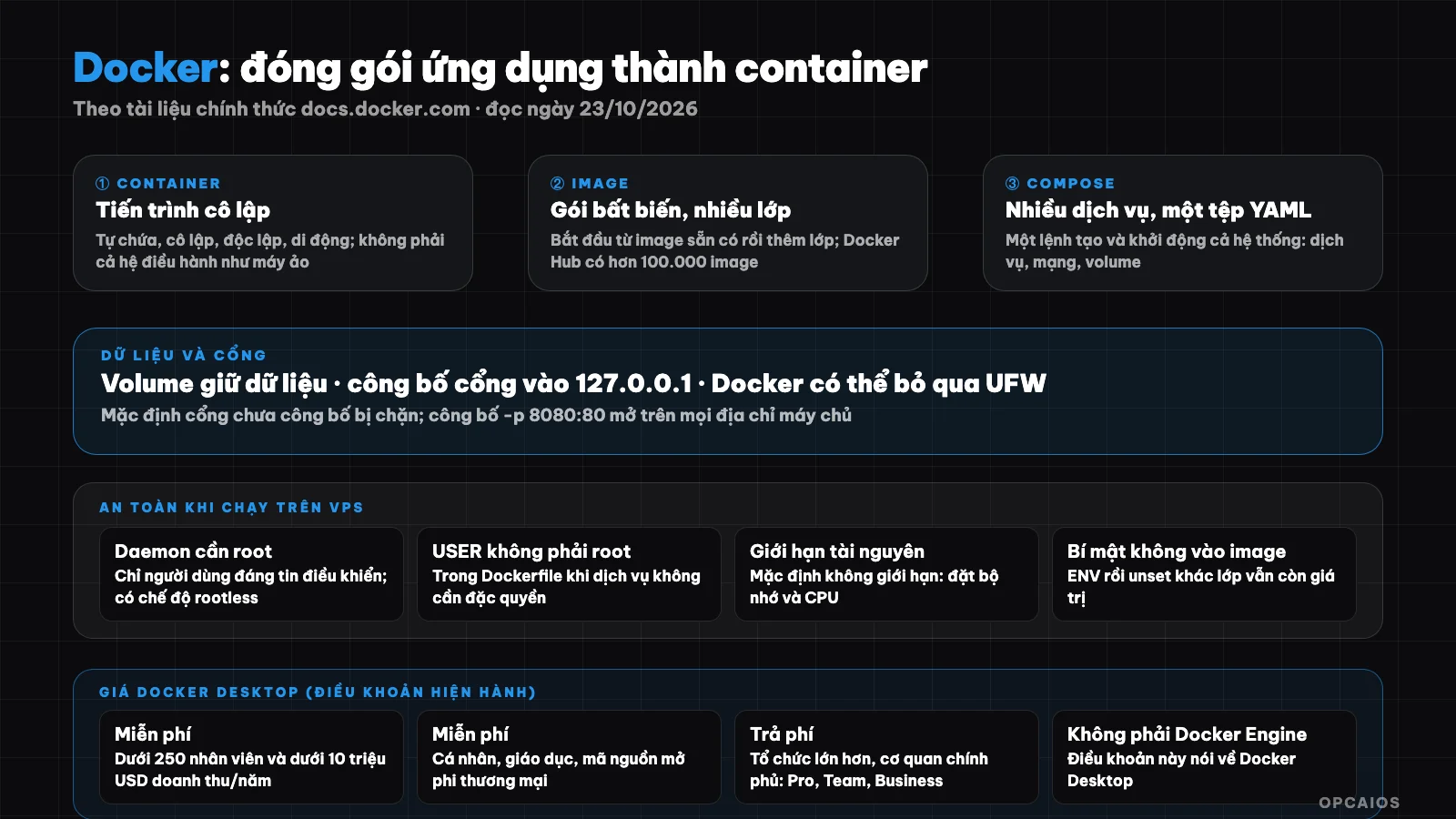
Image is built from immutable layers; container runs from image; volume keeps data; Compose connects multiple services. Diagram: OPCAIOS.
What is a container and how does it differ from a virtual machine?
A container is an isolated process for each component of an application, while a virtual machine (VM) is an entire separate operating system. For example, with an application made up of a React interface, a Python API, and a PostgreSQL database, according to Docker (as of 23/10/2026) each component runs in its own container, instead of installing Node, Python, and PostgreSQL on the machine and then worrying about version mismatches between the developer, CI/CD testing, and the real environment. With Docker, four characteristics of containers are:
- Self-contained: everything needed to run.
- Isolated: little impact on the server and other containers.
- Independent: deleting one container doesn't affect another.
- Portable: runs the same on a development machine, data center, or cloud.
A VM includes a kernel, hardware drivers, programs, and applications of its own, so starting a VM just to isolate one application is wasteful; a container is just a process plus the files it needs. Also, on VPS (which is itself a virtual machine), see What is VPS?.
What is an image?
An image (container image) is a standard package containing files, programs, libraries, and configuration to run a container. According to Docker's documentation (as of 23/10/2026), images follow two principles (according to Docker):
- Immutable: once created, it cannot be modified, only a new version can be created or layers added on top.
- Composed of layers: each layer is a group of changes to the file system.
After that, you start from an existing image, for example a Python image, then add layers to install libraries and your code. Docker Hub is the default repository to store and distribute images; Docker's documentation states there are over 100,000 images, including images that Docker supports and verifies (Docker Trusted Content). For example, the command docker run nginx pulls the nginx image from Docker Hub and runs it as a container. When building an image with Dockerfile, use the official version as the base and pin the version so the build can be repeated.
What is Docker Compose used for?
Compose is a Docker tool for defining and running multi-container applications. According to Docker (as of 23/10/2026) you describe services, networks, and volumes in a YAML file, then a single command creates and starts everything. First, Compose has commands to start, stop, rebuild, check status, and view logs of the entire system, and can be used for development, testing, pre-production, production, and CI environments. Next is an example using Compose, in which a PostgreSQL database can only listen on the server and has a volume to keep data:
services:
  db:
    image: postgres:16          # pin the version, don't use "latest"
    environment:
      POSTGRES_PASSWORD_FILE: /run/secrets/db_password
    ports:
      - "127.0.0.1:5432:5432"   # only the server can access
    volumes:
      - dbdata:/var/lib/postgresql/data
    secrets:
      - db_password
volumes:
  dbdata:
secrets:
  db_password:
    file: ./db_password.txt     # don't put this file in Git
Does data in a container get deleted when I delete the container?
Yes, data gets deleted when you delete a container unless you use a volume. A volume is a storage mechanism that keeps data beyond a container's lifetime; according to Docker (read on 23/10/2026), think of it as a shortcut connecting from inside the container to the outside. For example, when you restart a PostgreSQL container, you don't want to start with an empty database. There are three steps to keep data safe:
- Attach a volume to every important data directory, like
dbdata:/var/lib/postgresql/datain the Compose file above. - Don't treat a volume as a backup, because a volume lives on the same server as the container.
- Finally, back up outside the machine on a schedule, like the guide in What is a VPS?, and test recovery at least once a year.
Is exposing a container port safe?
It's only safe when you restrict the address. According to the port exposure documentation, by default Docker blocks access to unexposed ports; but when you expose a port (for example docker run -p 8080:80), that port is mapped on all addresses of the server so it can be accessed from anywhere outside. If you add a local address to the expose flag (-p 127.0.0.1:8080:80) then only the server itself can access it. The documentation adds a warning: in versions older than 28.0.0, machines on the same L2 network segment can still reach the exposed port on localhost.
The easiest thing to get wrong: Docker and the UFW firewall are incompatible; when you expose a port, traffic is redirected before it goes through UFW rules so your rules might be bypassed (see Docker documentation "Docker and ufw"). The good approach: only expose to 127.0.0.1, put your service behind nginx and control it through the DOCKER-USER chain.
What are Docker's security risks?
The biggest Docker risk is that the daemon process needs root privileges, which is clear when using Docker on a shared VPS. Also according to Docker (read on 23/10/2026) unless you choose rootless mode, the daemon runs with root privileges so only trustworthy users should control it; Docker allows you to share a directory from the host into a container without limiting permissions, meaning you could start a container with the root directory mounted and modify the filesystem at will. Beyond that, there are five things you should do (according to Docker):
- Don't let regular users into the Docker control group.
- In your Dockerfile, use
USERto switch to a non-root user if the service doesn't need privileges. - Don't put secrets in the image's environment variables: setting with
ENVthenunsetin another layer still keeps the value in the image, so use the secret mechanism instead. - Only pull images from trustworthy sources, like Docker Trusted Content.
- Set memory and CPU limits using flags on
docker run, because by default a container has no limit and a faulty service can crash the whole shared VPS.
How do I build a good image?
According to Docker's best practices documentation: use multi-stage builds so the final image only contains files needed to run and is smaller; use .dockerignore (syntax like .gitignore) to exclude irrelevant files from the build context; consider pinning the base image version instead of using floating tags; use docker build --pull --no-cache when you want a completely fresh build; and switch to a non-root user with USER.
Is Docker Desktop free?
Docker Desktop is free for some cases and costs money for the rest. According to Docker, via the official terms page (checked on 23/10/2026) there are two groups (according to Docker):
- Free: small businesses under 250 employees and under $10 million in revenue each year, personal use, education, and non-commercial open source projects.
- Needs a paid plan (Pro, Team, Business): professional use at larger organizations, government agencies, and commercial cases exceeding the free threshold.
Also, the terms talk about Docker Desktop, an app for personal machines, not Docker Engine running on a Linux server. Example scenario: a company of 30 employees with revenue of a few hundred thousand dollars a year falls below both thresholds, while a corporation with 500 employees needs a paid plan. Specific prices for Docker plans are not stated here; read Docker's terms and FAQ carefully if your organization is near the threshold.
OPCAIOS's Experience Using Docker
I use Docker selectively. The opcaios.org website runs directly via a process manager behind nginx, not packaged with Docker; Docker appears where I need to quickly set up a ready-made system: self-hosted Supabase (comprising database, authentication, storage, edge functions) running on Docker Compose (see What is Supabase?), a text embedding service for semantic search running in a container listening only internally (see What is RAG?), and a test database on my personal machine also running in a container. The most valuable lesson is the firewall: the firewall script on my VPS blocks container ports via the DOCKER-USER chain, and admin tools running on Docker only access via SSH tunnel after public admin ports were closed during a security review. I do not disclose container names, ports, or specific configurations.
When Should and Shouldn't You Use Docker?
Use it when you need consistent environments across machines, run multiple dependent services (database, queue), or deploy off-the-shelf software with existing images. Think carefully when the application is simple (a single Node.js process) and you already have a stable deployment process, since Docker adds a layer you must learn, needs image updates, and needs securing. If you have an AI agent write Dockerfile or Compose, re-read the sections on ports, permissions, and secrets; see What is Vibe Coding?.
How to Get Started with Docker?
- Install Docker (Docker Desktop on your personal machine, Docker Engine on Linux) and check licensing if using for a company.
- Run a ready-made image, for example
docker run -p 127.0.0.1:8080:80 nginx, then openlocalhost:8080. - Write a simple Dockerfile for your application, use
.dockerignoreand a non-root user. - Use Compose to run alongside a database, bind volumes for data.
- Pin image versions, set resource limits, publish ports to 127.0.0.1 only.
- Back up volumes outside the machine and monitor security updates for base images. If your application needs to connect to Git and deploy automatically, see What is GitHub?.
Frequently Asked Questions
What is Docker?
An open platform to package and run applications in containers, isolated environments loosely containing everything an application needs, running the same on a personal machine, server, and cloud.
How do containers differ from virtual machines?
Virtual machines are a whole operating system with their own kernel; containers are just an isolated process with necessary files so they are much lighter. Containers share the server's kernel.
Is Docker free?
Docker Desktop is free for small businesses (under 250 employees and under 10 million USD revenue per year), personal use, education, and non-commercial open source; larger organizations need paid plans. Please read the current terms.
Does Docker break UFW firewall?
Docker and UFW are incompatible: when you publish a port, traffic goes through the nat table before UFW rules so it can be bypassed. Publish ports to 127.0.0.1 only and control via the DOCKER-USER chain.
Will data in a container be lost?
Yes if you delete the container without using a volume. Bind volumes to important data and still back up outside the machine. If you want to learn how to use Docker and AI to build a safe automated infrastructure, see OPCAIOS's AI application training course.
Source: official Docker documentation (Docker overview, What is a container, What is an image, Compose, Persisting container data, Port publishing, Docker security, Resource constraints, Building best practices, Docker Desktop license agreement), read directly on 23/10/2026. Terms and pricing may change; specific prices for Docker plans are not stated. Configuration experience is from OPCAIOS, sensitive details are not disclosed.
Translated from Vietnamese with AI. Read the original.
Want to apply this in your business?
Book a free 30-minute call (Vietnam time, in English or Vietnamese).