

What is Dify?
Dify is an open source platform for building AI applications: you build chatbots, automated workflows, agents and RAG systems in a drag-and-drop workspace, then publish as a web app or call via API. The name Dify, according to official documentation, stands for "Do It For You". Dify has a cloud version (Dify Cloud, with a free Sandbox plan and Professional plan at $590 per year) and a Community self-hosted version using Docker Compose; according to GitHub (read 24/10/2026), the minimum configuration to run is 2 CPU cores and 4 GiB RAM.
This post covers: 1) main features; 2) plans and pricing, checked 24/10/2026; 3) how to self-host; 4) when to choose Dify over n8n or writing code yourself; 5) real experience from OPCAIOS running Dify as an assistant on our website. Finally, a notes section. For example, a small company can build a chatbot answering from internal documents without writing much code.
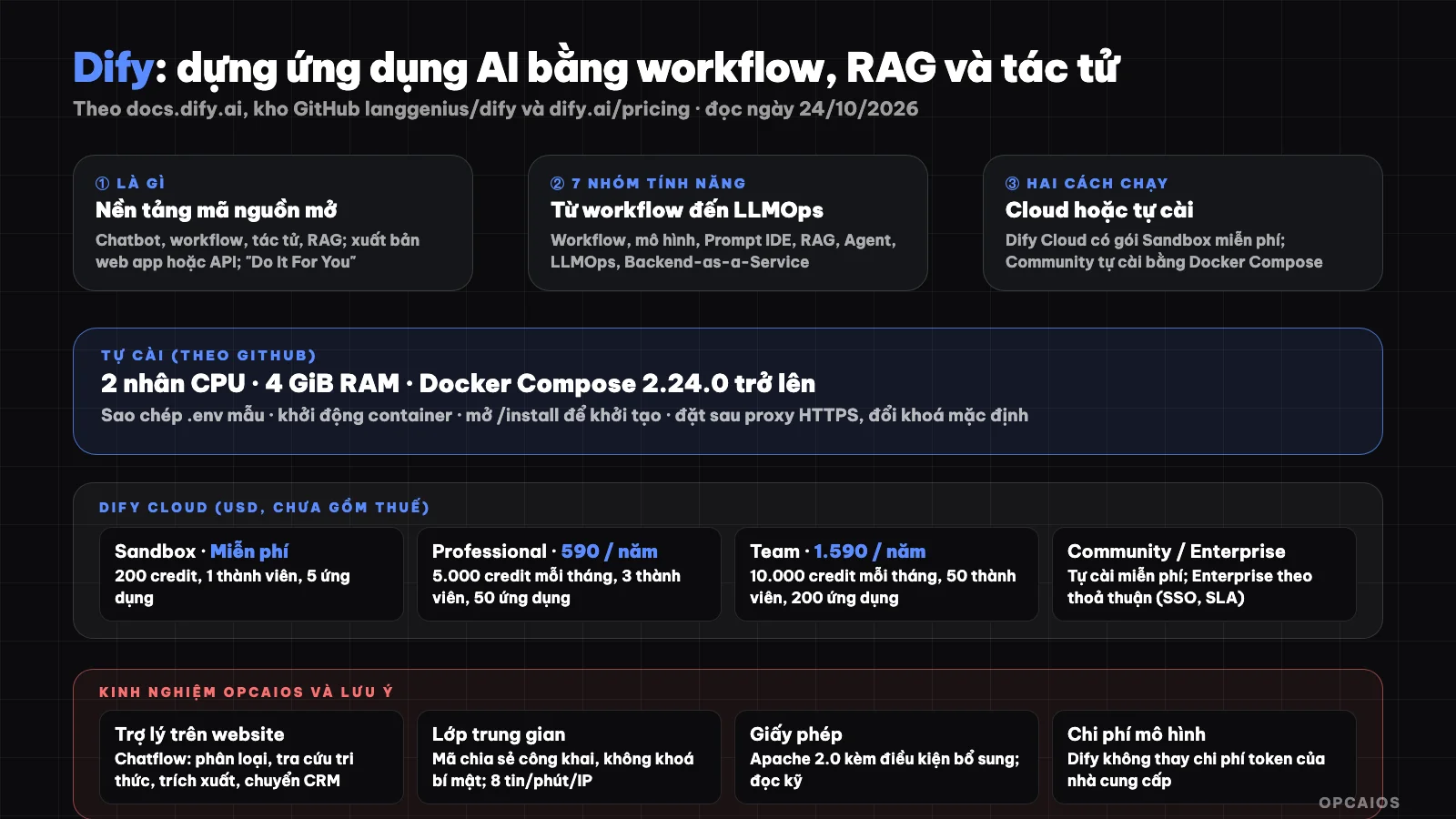
Dify puts workflow, RAG, agents and model management in one place, published as a web app or API. Diagram: OPCAIOS.
What is Dify?
Dify is "an open source platform for building AI applications", according to Dify's official introduction page, including agents, agentic workflows and chatbots using your own data. You publish as a web app or integrate into products via API. First, Dify brings everything into one place; next, each feature has an API. According to GitHub (read 24/10/2026), the project has around 159.4 thousand stars and 25.2 thousand forks at the time of reading. The license is "Dify Open Source License", described as based on Apache 2.0 with additional conditions; read the additional conditions carefully if you plan to use Dify to provide service to many customers. Example: an agency using one Dify instance to serve 20 customers may be subject to the additional conditions, so you need to read the full text, which OPCAIOS has not done. If you are new to language models, first read What is LLM?. Three things to remember. First, Dify has a Cloud version and a Community version. Next, the license has additional conditions. Finally, stars and forks change over time so they are only for reference.
What are Dify's main features?
Dify is a platform with seven feature groups, according to GitHub (read 24/10/2026):
- Workflow: visual canvas to build and test AI processes.
- Model support: connect multiple LLMs from multiple providers, including self-hosted models and OpenAI API-compatible models.
- Prompt IDE: write prompts, compare performance between models, add features like text-to-speech.
- Pipeline RAG: from document ingestion to retrieval, extract text from PDF, PPT and other formats.
- Agent: agents with their own sandbox, using skills, tools, MCP servers or custom APIs.
- LLMOps: track logs, performance, improve prompts and data over time.
- Backend-as-a-Service: all features have APIs to integrate into other applications.
The documentation also mentions the difyctl command line interface to run Dify applications from terminal, scripts, CI or other agents, plus a plugin system to extend tools, models and integrations, and a Marketplace of community application templates. For example, a team can ingest documents into Pipeline RAG, connect OpenAI or Anthropic models, then call the application via API.
Dify Cloud: plans and pricing
According to the official pricing page (prices in USD, excluding tax; annual payment saves 17%):
| Sandbox | Professional | Team | |
|---|---|---|---|
| Price | Free | $590 per workspace per year | $1,590 per workspace per year |
| Message credits | 200 (no period specified) | 5,000 per month | 10,000 per month |
| Members | 1 | 3 | 50 |
| Number of apps | 5 | 50 | 200 |
| Knowledge documents | 50 | 500 | 1,000 |
| Knowledge storage | 50 MB | 5 GB | 20 GB |
| Log history | 30 days | Unlimited | Unlimited |
Message credits are deducted by model type, and when exhausted you can switch to using your own API keys (providers listed include OpenAI, Anthropic, Gemini, xAI, Tongyi). Community version is free, open source, one workspace, you deploy yourself using Docker. Enterprise version is priced by agreement, with dedicated deployment, multiple workspaces, SSO, advanced security, SLA and official support. For example, a team of 3 people fits perfectly with the Professional plan. Pricing may change, check the current pricing page.
How to Self-Host Dify with Docker?
Self-hosting Dify with Docker means running the Community edition on your own server, and according to Dify's GitHub (as of October 24, 2026), it consists of four steps.
- Step 1: Prepare a machine with a minimum of 2 CPU cores, 4 GiB RAM, Docker and Docker Compose version 2.24.0 or higher (see What is Docker? and What is VPS?).
- Step 2: Go to the
dockerdirectory of the source code, copy the sample environment file to.env. - Step 3: Start the containers in background mode.
- Step 4: Open the
/installpath on the machine's address to initialize an admin account.
After that, place Dify behind a proxy server with HTTPS (see What is Nginx?), change all default passwords and keys in the environment file, and do not expose the database's internal ports to the Internet. For example, a 2-core CPU, 4 GiB RAM VPS meets the minimum requirements to try it out. Finally, back up the database before each Dify version upgrade.
When Should You Choose Dify?
You should choose Dify when you need to build an AI application with knowledge management and prompts, according to OPCAIOS's general assessment (not a measurement), across four situations.
- Chatbot or assistant using private documents, needing a knowledge management interface: choose Dify (integrated RAG).
- Multi-step workflow with conditional branches calling LLM, wanting to build quickly without writing much code: choose Dify workflow.
- Automating connections between hundreds of SaaS applications using events (webhooks, schedules): choose tools like n8n or Make.
- Need control over every line of code, specific performance requirements: write code yourself using the model provider's SDK.
These two groups support each other: you can use automation tools as an event layer and call Dify when you need an AI step. For connecting through API, see What is API? and What is Webhook?; for the knowledge part, see What is RAG?.
OPCAIOS's Experience
OPCAIOS self-hosts a Dify instance on its own server and uses it as a "Personal Assistant" on the website. The assistant is a Chatflow consisting of four steps in order: 1) classify customer needs; 2) look up knowledge; 3) extract contact information; 4) transfer information to CRM. Instead of using Dify's built-in chat frame, OPCAIOS built its own interface on the website through an intermediate layer on the server side that calls Dify using the public shared key of the application (without embedding secret keys), with a limit of eight messages per minute for each IP address, and displays the status of each step ("Looking up knowledge...") to the customer. The Dify service also sits on the system's monitoring checklist for periodic checks, with alerts when it goes down. We don't have official numbers on the rate of customers leaving information through the assistant, so we don't include effectiveness numbers in this post.
Finally, a practical lesson: building quickly with a drag-and-drop interface is very convenient, but the user experience part, abuse prevention, and application code security still need to be done at the intermediate layer.
Notes When Using Dify
- License: read Dify Open Source License's supplementary terms before commercial use.
- Data: the cloud version sends data through your chosen model provider; sensitive documents should consider self-hosting and internal models.
- Model costs: Dify does not cover the token costs of your model provider; keep track of them.
- Abuse prevention: public applications need rate limiting and input validation.
- Updates: monitor releases and back up the database before upgrading.
Read more: How to Create an AI Chatbot That Self-Learns Internal Documents (RAG) Using Dify and Supabase, 5 Best Process Automation Tools 2026.
Frequently Asked Questions
What is Dify?
An open source platform to build chatbots, workflows, agents and RAG systems using a visual interface, published as web apps or APIs.
Is Dify free?
Dify has two free paths: the Sandbox plan on Dify Cloud and the self-hosted Community edition. According to Dify's official pricing page (read 24/10/2026), the Sandbox plan is limited to 200 message credits, 1 team member and 5 apps. The Professional plan costs $590 per year per workspace, including 5,000 credits per month, 3 team members and 50 apps. The Team plan costs $1,590 per year, including 10,000 credits per month, 50 team members and 200 apps. Prices exclude tax; annual payment saves 17%. The Community edition is free and open source, but you pay for server costs and maintenance yourself. For example, an individual can try the Sandbox, while a team of 3 needs Professional. The Enterprise plan is custom priced, and prices can change so check the current pricing page.
What minimum setup do I need to self-host Dify?
According to the GitHub repo: 2 CPU cores, 4 GiB RAM, Docker and Docker Compose 2.24.0 or later.
How is Dify different from n8n?
Dify focuses on AI applications (LLM, RAG, agents) with knowledge management and prompt engineering; n8n excels at automating integrations across many apps through events. You can use both together: n8n handles the event layer and calls Dify when you need an AI step.
Can I embed Dify into my own website?
Yes, through a web app or REST API. To learn how to build an AI assistant and automate for your business, see OPCAIOS's AI application training course.
Source: docs.dify.ai (introduction), the langgenius/dify GitHub repo and dify.ai/pricing pricing page, read directly on 24/10/2026. Star counts, prices and limits change over time, prices exclude tax. We have not read the full text of the Dify Open Source License. The "when to choose" comparison table is our general assessment. Experience is from OPCAIOS.
Translated from Vietnamese with AI. Read the original.
Want to apply this in your business?
Book a free 30-minute call (Vietnam time, in English or Vietnamese).